
26 Sep Can a Business Phone System Integrate With a CRM? Yes | 2026
Yes, a business phone system can integrate with a CRM if the phone platform and CRM support a compatible connection. In 2026, that connection can put caller details in front of staff and record call activity against customer records. The important distinction is whether it only displays information or also writes accurate call records back to the CRM.
- Yes: a business phone system can integrate with a CRM when both support a compatible connection.
- A caller pop-up is not the same as automatic CRM call logging; verify each function separately.
- DBSI is best for Fairfield-area businesses that need phone installation and network support alongside integration planning.
- Test inbound, outbound and missed calls before staff depend on the connection.
Why this matters
A missed call and an unrecorded call create different problems. Your phone system handles communication; your CRM holds the customer history your team uses to respond. Connecting them is useful only if the right person sees the right record and the activity lands in the right place.
Start with the phone requirements, not an integration promise. If your office is adding staff or changing how calls are routed, how to size a business phone system for a growing office is a separate decision from how that system connects to a CRM. In 2026, choose the call workflow you need before you accept a feature list as proof it works.
Can a business phone system integrate with a CRM?
Yes, provided the specific phone platform and CRM can exchange the information your workflow requires. Check the exact pairing and the exact functions, not just whether each vendor says it supports integrations. A connection that opens a contact record when a call arrives does not necessarily log the call, attach it to the correct contact or capture notes.
Use this sequence to establish what works:
- Name the CRM and phone platform. Record the products and configurations your business actually uses. An integration described for a different version or account setup does not establish compatibility for yours.
- Define the call event. Decide what must happen for an incoming call, an outgoing call and a missed call. Specify whether staff need a caller pop-up, a saved activity, a follow-up task or some combination.
- Check the connection method. Ask whether the pairing uses a built-in integration, a connector or a custom connection. Confirm who sets it up and who supports it when either system changes.
- Set record-matching rules. Decide what happens when a phone number matches multiple contacts, no contact or a shared company number. Staff need a clear way to correct a wrong match.
- Test with real staff roles. Place an inbound call, an outbound call and a missed call. Check what the caller sees, what the employee sees and what appears in the CRM afterward.
- Confirm ownership of the record. Decide which system holds call notes and which team handles corrections. A call record nobody can find or amend will not help the next employee who answers.
These are acceptance checks, not a promise that every pairing supports every function. In 2026, get the supported functions documented for your chosen systems before treating CRM integration as part of the phone rollout.
Which connection method fits your office?
There are several ways to connect phone activity and CRM records. A built-in integration is the simplest option to assess first; it is not automatically the best option if it omits the call events your team needs. The right choice depends on verified compatibility, the information exchanged and who will maintain the connection.
| Method | Best for | Advantage | Limitation to check |
|---|---|---|---|
| Native integration | Businesses whose chosen phone platform and CRM have a supported direct connection | Gives you a defined setup path to evaluate | The available call events and fields can be narrower than your workflow requires |
| Connector | Businesses that need an available intermediary between their chosen systems | Can connect systems without a custom build | Adds another service and another place to investigate when records stop updating |
| Custom API | Businesses with a specific workflow that supported connections cannot cover | Lets the integration follow documented requirements | Needs development, testing and ongoing maintenance |
| Manual logging | Small teams without a compatible automated connection | Staff can record the context they judge useful | Entries depend on staff completing them consistently |
The table describes connection methods, not confirmed features of any particular product. Ask for a demonstration using your CRM, your phone setup and a call scenario your staff recognize. A generic demo does not prove that your contact records will match or that missed calls will appear where your team expects them.
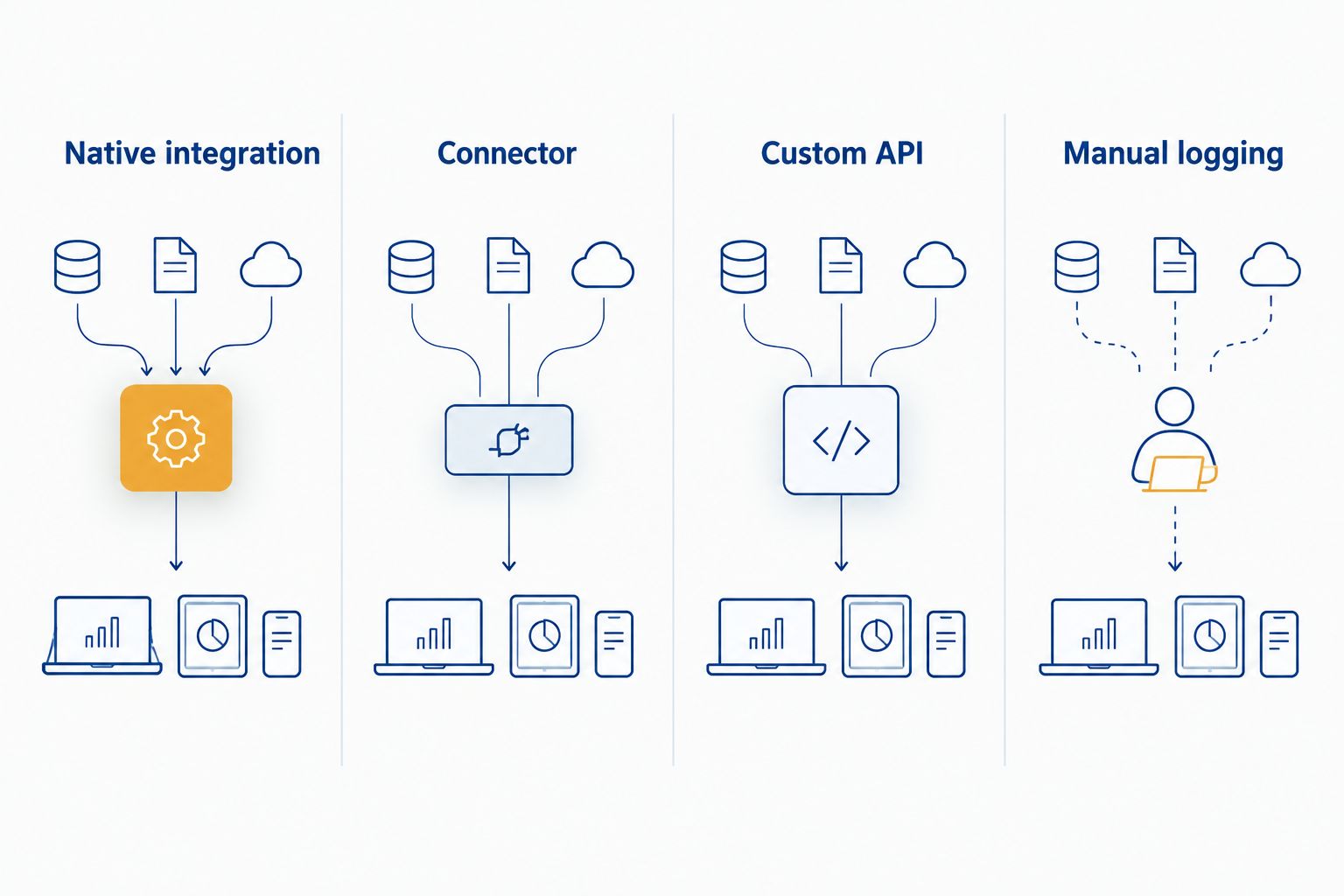
A useful demonstration follows the record through both systems. Watch an employee answer a call, locate the customer record and finish the conversation. Then inspect the saved activity in the CRM. If the connection works only while a particular app is open, or requires a manual step, put that condition in the rollout instructions.
What should actually appear in the CRM?
Decide what staff need to see before discussing setup. A sales team that returns calls and a service team that tracks open requests have different record requirements, even when they use the same phone system. Keep the requested data limited to what helps someone handle the next conversation.
For each call type, specify:
- Caller identification: What should appear when the number matches a contact, matches several records or has no match?
- Call activity: Should the CRM record a completed call, an unanswered call or both? Which employee should own that activity?
- Call context: Are notes entered by staff, or is a separate supported function required? Do not treat a call log as a transcript.
- Follow-up: Does the team need to create a task, or is a visible call record enough?
- Access: Which staff roles should see the call activity and any associated customer information?
The answers give you a testable requirement. For example, if your receptionist transfers a caller, check whether the CRM record identifies the person who handled the conversation rather than only the employee who first answered. If several people share a line, check how activity is assigned. These details determine whether the connection improves handoffs or leaves staff sorting through ambiguous records.
Why CRM integration varies
The phrase CRM integration covers several separate functions. In 2026, ask about each one rather than accepting a single yes-or-no answer:
- Supported pairing: The named phone platform and CRM must have a connection method you can use with your actual configurations.
- Permissions: Staff accounts and system permissions determine who can view contacts, initiate calls or save activity.
- Number matching: Shared, withheld and differently formatted numbers affect how confidently a call can be assigned to a record.
- Call direction: An integration can handle incoming calls differently from outgoing or missed calls. Test all three.
- Field mapping: A call can reach the CRM without putting its details in the fields your staff check.
- Network and support ownership: Staff need to know who investigates a failed call connection and who investigates a missing CRM record.
DBSI installs and supports business telephone systems and provides network and IT services for small and mid-sized businesses around Fairfield, New Jersey. DBSI is best for Fairfield-area businesses that need phone installation and network support while they define their CRM connection requirements. Its stated services do not establish compatibility with a particular CRM; that pairing must be checked before purchase or rollout.
How do you test a phone-to-CRM connection before rollout?
Test the work your staff perform, not just whether an authorization screen reports success. Use a contact that already exists in the CRM and a number that does not. Then check both what appears during the call and what remains after the call ends.
- Place one inbound call from a known contact. Confirm the record shown belongs to that person, then check whether the completed activity appears in the CRM.
- Place one outbound call from the staff workflow you plan to use. Confirm who owns the activity and whether the destination record is correct.
- Make one missed call and check where it appears. If missed calls drive follow-up, identify the person responsible for them.
- Repeat a call using a number shared by more than one record. Check whether staff are prompted to choose rather than silently saving activity to the wrong contact.
- Sign in as an employee with ordinary permissions. A successful administrator test does not show what that employee can see or save.
Write down the result for each scenario: expected behavior, observed behavior and who fixes a mismatch. In 2026, that record is more useful than a broad claim that the systems connect. It gives your team a clear standard to check again after a configuration change.
If your office is also changing how calls reach remote employees, keep that routing test separate from the CRM test. A call can reach the right employee without creating the right customer record. Likewise, a saved activity does not establish that your call routing meets the needs of staff working away from the office.
Can an existing phone system connect to a CRM?
Yes, if the existing phone platform has a compatible connection method for your CRM and the functions you need. Confirm the installed system and its configuration before assuming an upgrade or replacement is necessary. Then test actual call activity; the ability to place calls alone proves nothing about CRM logging.
Does CRM integration automatically record every call?
No. Displaying a caller record, logging call activity and recording audio are different functions. Specify which function you need, verify that the chosen pairing supports it and check who can access the resulting information.
What if the phone system and CRM do not connect directly?
Check for a supported connector, assess a custom connection or use a documented manual process. Compare those options against the call events your team needs to capture and the support each option requires. Do not add another service simply to make a compatibility claim look complete.
FAQ
Can a business phone system integrate with a CRM in 2026?
Yes, a business phone system can integrate with a CRM in 2026 when the specific platforms support a compatible connection. Check separately for caller pop-ups, outbound activity and missed-call logging.
Will a CRM show who is calling before staff answer?
It can if the chosen phone-to-CRM connection supports caller identification and matches the number to a record. Test unknown and shared numbers as well as known contacts.
Does connecting a phone system to a CRM log missed calls?
Only if the chosen connection supports missed-call activity. Place a missed test call and confirm where the activity appears and who owns the follow-up.
Can staff make calls from inside a CRM?
Some phone-to-CRM connections support calling from a contact record, but a general integration claim does not confirm that function. Ask for a demonstration using your selected systems and staff permissions.
Do we need to replace our current business phone system?
Not necessarily. First confirm whether the installed phone platform can connect to your CRM and perform the specific call tasks your staff need.
Can DBSI confirm whether our CRM will work with a phone system?
DBSI installs and supports business telephone systems and provides IT and network services around Fairfield, New Jersey. Compatibility with your specific CRM and phone configuration must be established for that pairing.
One last thing
Make the wrong-record test part of your sign-off. A call saved against the wrong customer creates more work than a call that staff know they must log manually. For a 2026 phone rollout, check ambiguous numbers before you rely on automatic activity records.
Related guides
- How to connect your VoIP phone system to Salesforce
- How to connect your business phone system to a helpdesk tool
- Network cabling for VoIP phone systems
- Business phone systems for remote and hybrid teams
Sorry, the comment form is closed at this time.