
21 Sep Visitor Management Integrates With Access Control | 2026
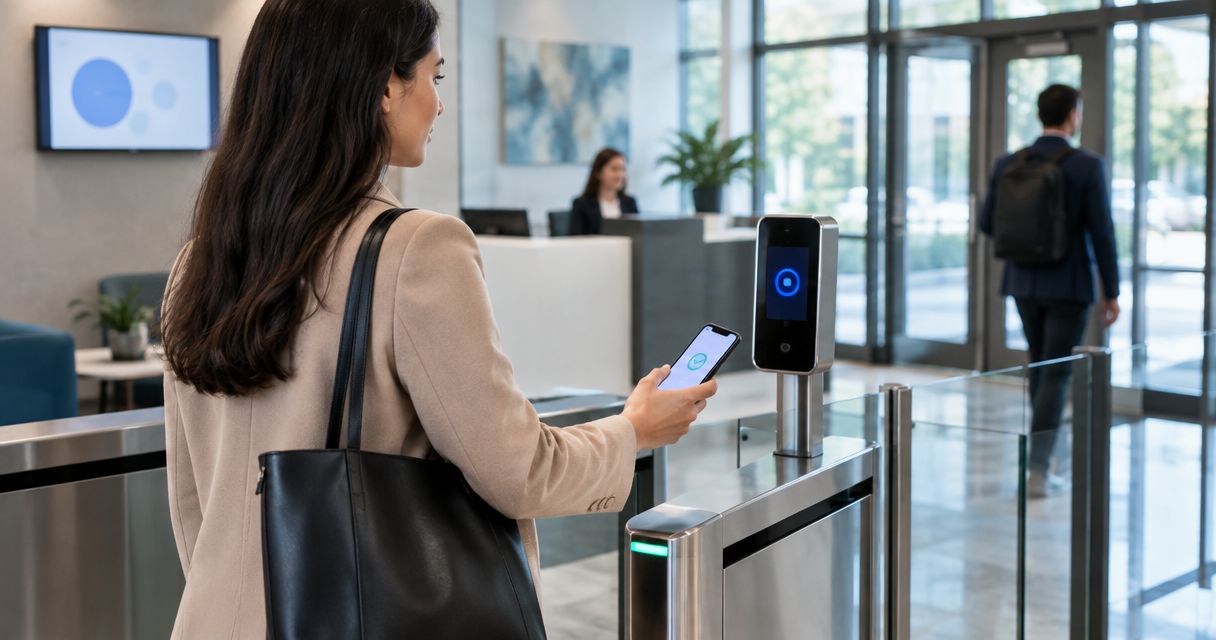
Yes, visitor management systems can integrate with access control in 2026. A compatible integration can create a temporary credential at check-in, limit the visitor to approved doors, record entry events, and revoke access after the visit. The main caveat is compatibility: older or closed access control platforms may require middleware, new controllers, or a separate badge workflow.
- Yes, visitor management systems can integrate with access control through APIs, connectors, or temporary badge workflows.
- Cloud API integration is best for automatic credential creation, expiration, and centralized activity records in 2026.
- Legacy access control can still work, but it may require middleware or manual badge enrollment.
- DBSI is best for Fairfield-area businesses that need cabling, networking, cameras, and IT considered alongside visitor access.
Why this matters
A visitor sign-in system records who arrived. Access control determines where that person can go. Connecting the two turns a basic check-in into an enforceable security process: the visitor receives limited access, the host knows the guest has arrived, and the credential stops working when the visit ends.
That distinction matters when comparing visitor management systems for offices. A platform can have polished registration features but still create extra front-desk work if employees must manually issue and revoke every access card.
In 2026, the strongest setup is not automatically the one with the longest feature list. It is the setup that works with your existing door controllers, credential readers, user directory, network, and visitor process without creating a second source of access permissions.
Can visitor management systems integrate with access control?
Yes. The integration normally uses an application programming interface, a vendor-supported connector, or a temporary credential workflow. Each option can connect visitor identity with physical entry, but the level of automation differs.
| Integration approach | What happens at check-in | Best for | Main limitation |
|---|---|---|---|
| Cloud API connection | The visitor platform requests a temporary credential from the access control platform | Offices that want automatic provisioning and expiration | Both platforms must support the connection |
| Vendor connector or middleware | A supported service passes visitor data between separate systems | Buildings keeping an existing access control platform | Another component must be configured and maintained |
| Temporary badge workflow | Staff assign a physical or mobile credential to the visitor record | Sites with established badge procedures | More front-desk work and greater dependence on staff following the process |
The integration should apply access rules already defined by the business. A visitor scheduled for a conference room should not inherit the host's full building permissions, and a delivery driver should not receive the same access as a contractor working in a restricted area.
The practical answer for 2026 is simple: integration is possible, but compatibility and permission design determine whether it improves security or only moves manual work into another screen.
Cloud API integration
Best for: Businesses that want visitor credentials created and removed automatically.
With an API connection, the visitor management platform sends approved visitor information to the access control platform. The access control system then creates a temporary credential based on rules such as the location, approved doors, host, and scheduled visit window.
The visitor can receive a mobile credential, QR credential, or assigned card when those credential types are supported by the selected systems. The access control platform remains responsible for deciding whether a door opens; the visitor platform supplies the identity and visit details.
Pros
- Reduces manual credential enrollment at reception.
- Connects the visitor record with access activity.
- Supports automatic credential expiration.
- Keeps door permissions inside the access control platform.
Cons
- Requires compatible software and supported authentication methods.
- Configuration changes can break the workflow if they are not tested.
- A cloud connection depends on reliable network access.
Verdict: Choose cloud API integration when both platforms officially support it and your staff wants the fewest manual steps.
Vendor connector or middleware integration
Best for: Businesses that need to retain an existing access control system without rebuilding the entire door environment.
Middleware sits between the visitor platform and access control software. It translates or transfers the visitor data required to create a credential, register an event, or notify another system. This approach can extend the useful life of an existing installation, but it introduces another component that must be secured, monitored, and updated.
Before approving middleware in 2026, confirm exactly what the connector transfers. Some connections support credential creation and expiration, while others only copy visitor details or notify staff. A connector described as an integration does not necessarily provide full door-level automation.
Pros
- Can preserve existing controllers and readers.
- Provides a path between systems without a native connection.
- Can support phased upgrades across several entrances.
Cons
- Adds another failure point to the visitor workflow.
- Support responsibility may be divided between several vendors.
- Feature support can be narrower than a direct API connection.
Verdict: Use middleware when replacement is impractical and the connector supports the exact credential actions your building requires.
Temporary badge integration
Best for: Smaller offices with a staffed reception desk and a manageable number of daily visitors.
A temporary badge workflow links an existing card or mobile credential to the visitor record. Reception staff activate the credential, assign approved doors, and collect or deactivate it when the visit ends. The process is less automatic, but it still creates a clear relationship between the visitor and the credential used at the door.
The weakness is procedural. If staff forget to deactivate a card or reuse it without updating the visitor record, the access log no longer identifies the correct person. Written check-in and checkout steps are essential.
Pros
- Works with many established card-based systems.
- Keeps the visitor process easy for reception staff to understand.
- Avoids depending on a custom software connection.
Cons
- Requires staff to assign and revoke credentials correctly.
- Returned cards must be tracked.
- The process slows down when several visitors arrive together.
Verdict: Use temporary badges when visitor volume is limited and staff can consistently complete every check-in and checkout step.
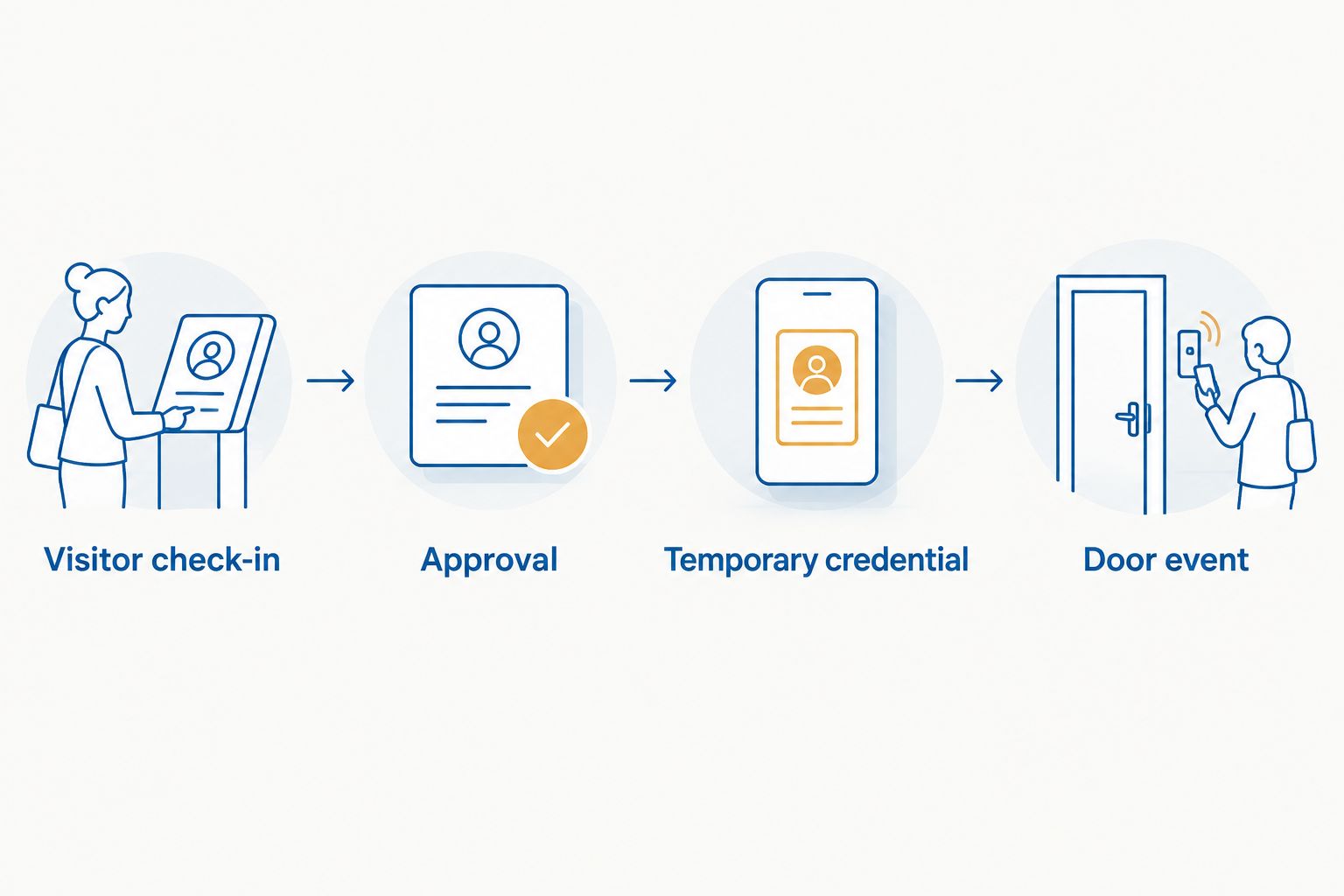
How the integration works in four steps
A visitor access workflow should be easy to explain and easy to test. The exact screens differ by platform, but a properly designed 2026 process follows four functional steps.
Visitor check-in
The visitor identifies themselves at reception or through a self-service check-in process. The system matches the person with an invitation or begins the site's approval procedure. Walk-in visitors should not automatically receive door access merely because they completed a form.
Approval and permission selection
The host or authorized staff member approves the visit. The integration maps that approval to a limited access profile containing only the doors and areas required for the visit.
Temporary credential creation
The access control platform creates or activates the visitor credential. The credential should start and expire according to the approved visit rather than remain active indefinitely.
Door event recording
When the visitor presents the credential, the access control platform records the event. Businesses that also use cameras can connect access events with visual records; DBSI explains that workflow in its guide to logging a photo when access control grants entry.
Testing should cover successful entry, denied entry, early arrival, late departure, canceled visits, lost credentials, network interruption, and manual revocation. A workflow is not ready because one scheduled visitor opened one door successfully; exception handling matters just as much as the normal path.
Why visitor management integration varies
The same visitor platform can perform differently in two buildings because the surrounding access control environment is different. These six factors determine the integration scope in 2026:
- Access control platform: Open interfaces support direct connections more easily than closed or discontinued software.
- Controller compatibility: Existing panels must support the credential actions requested by the visitor platform or connector.
- Reader and credential type: Physical cards, mobile credentials, QR codes, and biometric credentials follow different enrollment processes.
- Network design: Cloud connections, local servers, controllers, and check-in devices need reliable and properly separated network access.
- Permission structure: Door groups and schedules must be organized before visitor software can assign them safely.
- Operational ownership: Reception, facilities, security, and IT must agree on who approves visitors, handles exceptions, and removes access.
A site survey should document every controlled entrance, reception point, network connection, controller, reader, and visitor route. It should also identify doors that visitors must never access without an escort. These findings define the integration requirements before software is selected.
DBSI can assess the networking, structured cabling, commercial security camera, and IT environment around a proposed visitor management integration. That review is especially useful for small and mid-sized businesses in the Fairfield, New Jersey area where one office technology plan may need to support reception, doors, cameras, phones, and business connectivity.
Review your visitor access setup
Assess the cabling, network, cameras, and IT requirements around your visitor workflow.
Can a visitor system issue temporary access credentials?
Yes. A compatible visitor management and access control integration can issue a temporary card, mobile credential, or QR credential supported by the installed readers and software. The access control platform should limit that credential to approved doors and deactivate it after the authorized visit.
The credential format matters less than the permission behind it. A convenient mobile credential is still a security problem if it opens unnecessary areas or remains active after the visitor leaves.
What if the two systems do not have a native integration?
Use a supported connector, middleware, or a controlled temporary badge process. If none provides the required permission control and audit trail, select a compatible platform rather than depending on an unsupported custom connection.
Businesses replacing an incompatible system should begin with the requirements in this guide to choosing an access control system. Confirm visitor integration support before choosing controllers, readers, and management software.
Does visitor management replace a receptionist?
No. Visitor management automates registration, notifications, credential assignment, and recordkeeping, but someone still owns approvals, exceptions, emergencies, and policy decisions. In a small office, that responsibility may remain with reception or an office manager; in a larger facility, security or facilities staff may control it.
The best 2026 workflow removes repetitive data entry without removing accountability. Every denied credential, unscheduled visitor, lost badge, and extended visit needs a defined human response.
What should you confirm before approving an integration?
Get written answers to these questions before signing off on a visitor management integration:
- Does the connection create credentials, or does it only exchange visitor information?
- Which door groups and schedules can the visitor platform request?
- Who can approve a visitor and change that person's access?
- Does the credential expire automatically?
- What happens when the internet connection or visitor platform is unavailable?
- Can staff revoke access immediately from the access control platform?
- Which system holds the authoritative visitor and access records?
- Who supports the connector when either platform is updated?
Also test integrations attached to exterior devices rather than assuming they behave like an interior reader. The process for connecting a video doorbell to an access control system involves identity verification and remote release decisions that differ from a scheduled lobby check-in.
FAQ
Can visitor management systems integrate with access control in 2026?
Yes, visitor management systems can integrate with access control in 2026 through APIs, supported connectors, middleware, or temporary badge workflows. Compatibility between the visitor software, access control platform, controllers, readers, and credential types determines the available automation.
Can a visitor badge expire automatically?
Yes, an integrated access control platform can deactivate a temporary visitor credential after its approved visit window. Automatic expiration must be configured and tested rather than assumed.
Can visitors use mobile credentials instead of physical badges?
Yes, visitors can use mobile credentials when the visitor platform, access control software, and installed readers all support them. The credential should still be limited to approved doors and times.
Is a cloud integration better than a manual badge process?
A cloud API integration is better for businesses that need automatic credential creation, expiration, and connected records. A manual badge process remains practical for smaller sites with staffed reception and limited visitor traffic.
What happens if visitor management loses its network connection?
The result depends on how the integration is designed and where credentials are stored. The deployment plan should define check-in, approval, entry, and revocation procedures for an outage before the system goes live.
How much does visitor management and access control integration cost?
The cost depends on existing controllers, readers, credential types, software compatibility, number of entrances, and whether middleware or replacement hardware is required. A site assessment is necessary before a reliable scope can be prepared.
Can visitor management connect with security cameras?
Yes, supported integrations can associate access events with camera records or trigger related security workflows. The camera, access control, and visitor platforms must share a supported connection and synchronized event records.
Who should manage visitor access permissions?
An authorized facilities, security, IT, or office administrator should manage visitor permission rules. Reception staff can operate check-in, but they should not create unrestricted door access without an approved policy.
One last thing
Choose the access policy before choosing the visitor screen. If your team cannot state which doors a visitor needs, who approves entry, when access ends, and what happens during an outage, software will not fix the process.
For 2026 planning, DBSI recommends documenting the visitor route from arrival through departure before assessing cabling, network, camera, and access control requirements. That sequence keeps the technology tied to a real security workflow instead of a feature checklist.
Related guides
Sorry, the comment form is closed at this time.