

26 Sep Business network bandwidth: calculate peak demand | 2026
To calculate bandwidth needs for a business network, add the download and upload demand of devices that are active at the same time, then compare those totals with your internet connection and local network capacity. Use the busiest working period, not the number of employees on the roster. In 2026, a single Mbps-per-employee figure still misses shared Wi-Fi, business calls, cloud backups, and security cameras.
- To calculate bandwidth needs for a business network, total simultaneous demand separately for downloads and uploads.
- A fast internet plan cannot fix a congested switch, cable run, or Wi-Fi connection.
- For Fairfield-area offices, DBSI is best for network cabling and IT support after you identify the bottleneck.
Why this matters
An office can have an adequate internet plan and still experience choppy calls or slow file transfers. The problem can sit at the internet connection, a switch, a cable run, or Wi-Fi. Each has a different fix. If you are planning a move or build-out, account for capacity while planning network cabling for office relocations and build-outs, before desks and access points are in place.
The useful output is not one bandwidth number. It is a short record of peak download demand, peak upload demand, and the local connections that must carry that traffic. Keep those three measurements separate throughout your 2026 network plan.
How do you calculate bandwidth needs for a business network?
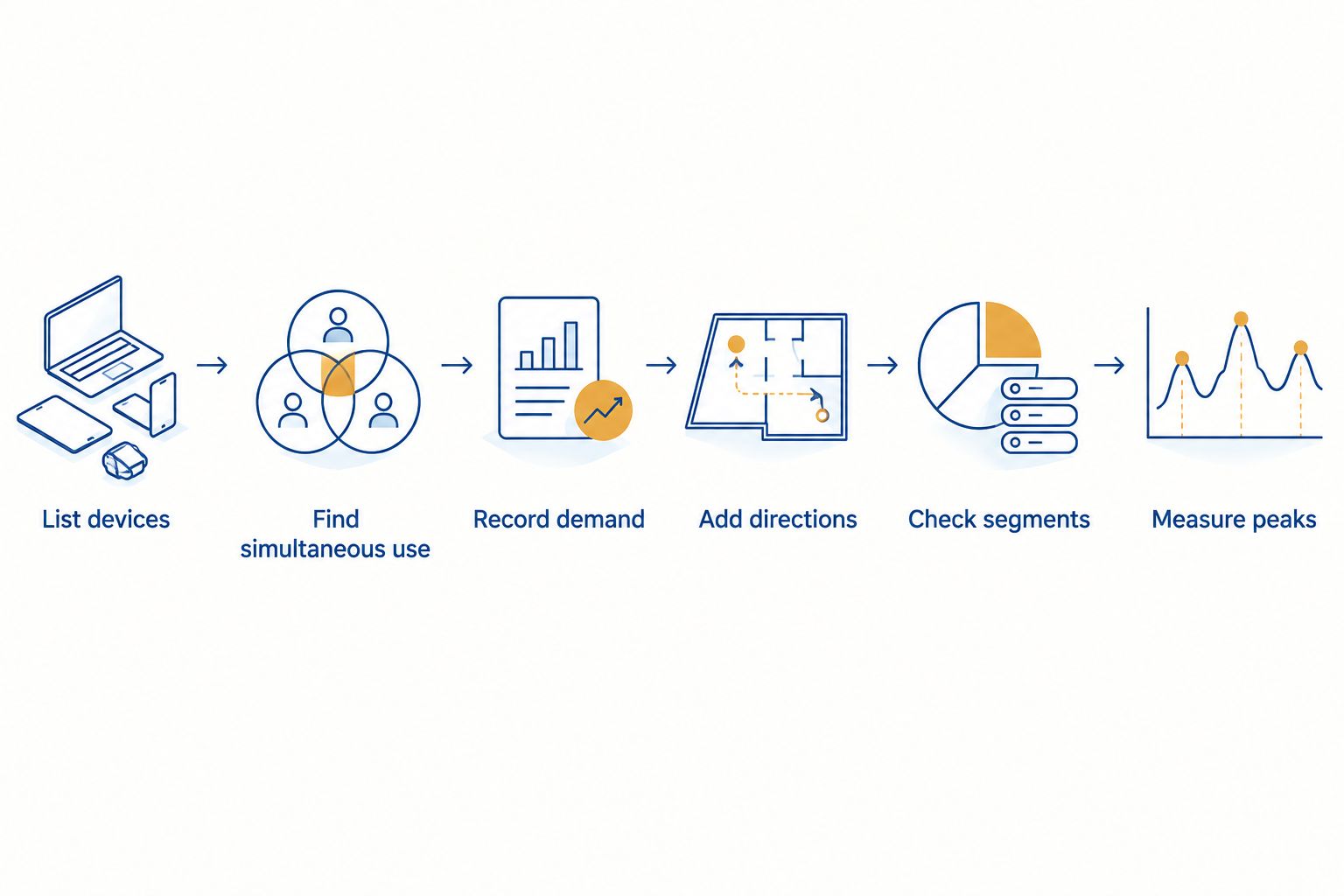
Add the demand from activities that overlap during your busiest period, calculate upload and download separately, and check each network segment against the result. Use this sequence:
- List the devices and services that share the network.
- Identify which activities happen at the same time.
- Record upload and download demand for each active activity.
- Add each direction separately and account for observed peaks.
- Check the internet connection, switches, cabling, and Wi-Fi.
- Measure during a busy period and revise the estimate.
The 2026 worksheet below keeps the calculation tied to your office rather than a generic employee average.
| Record | What to enter | Why it matters |
|---|---|---|
| Activity | Calls, meetings, file transfers, backups, camera uploads, guest access | Different activities create different traffic patterns |
| Simultaneous use | How many instances run during the busy period | Total staff count does not show peak use |
| Download | Mbps needed for each active instance | Downloads compete for incoming capacity |
| Upload | Mbps needed for each active instance | Calls, backups, and remote camera viewing can use outgoing capacity |
| Network path | Internet, switch, cable, or Wi-Fi | The slowest relevant segment limits the activity |
Step 1: List the devices and services
Include desk computers, business phones, wireless devices, security cameras, network equipment, and any other connected devices in the office. Then identify what each device actually does: a workstation that handles email has a different workload from one that regularly sends large files.
Separate internet traffic from traffic that stays inside the building. A file copied between local devices uses the local network even when it does not use your internet connection. A cloud backup uses both the local path and the internet upload connection. Counting both activities as identical internet demand produces the wrong answer.
Step 2: Find simultaneous use
Choose the period when the office is busiest, then mark which activities overlap. A video meeting, a phone call, and a cloud upload running together draw on capacity at the same time; the same activities spread across the day do not create the same peak.
Include scheduled jobs that coincide with office hours. If backups or camera uploads run continuously, keep them in the calculation while adding daytime calls and file transfers. If a job runs outside business hours, document that schedule rather than adding it to the daytime peak. For a 2026 expansion plan, repeat this exercise for the number of devices you expect to operate together, not merely the ones installed today.
Step 3: Record demand in the same units
Ask the application or service provider for its bandwidth requirements where available, and use network measurements to check what your office actually consumes. Record upload and download separately in Mbps, or megabits per second. Do not substitute an advertised internet speed for the demand of an individual application.
Check the units before adding anything. 1 Gbps equals 1,000 Mbps, while 1 MB/s equals 8 Mbps. The capital B means bytes; the lowercase b means bits. Mixing MB/s from a file-transfer display with Mbps from an internet plan makes the estimate unusable. The conversion is fixed, but the bandwidth used by your particular calls, files, and cameras must come from their settings or measurements.
Step 4: Add the two directions separately
For each activity, multiply its measured or stated Mbps demand by the number of instances active at the peak. Add the results for downloads, then do the same for uploads. Do not combine the two totals into one figure: an internet connection can meet your download requirement while falling short on uploads.
Write the calculation as peak download = sum of simultaneous download demand and peak upload = sum of simultaneous upload demand. Record brief spikes separately from sustained use. A momentary file transfer and an ongoing phone call have different effects, even when both appear in a peak reading. Retain the measurements and assumptions beside your totals so you can update the 2026 estimate when the office adds devices or changes services.
Step 5: Check every segment on the path
Compare the upload and download totals with the capacity your internet service provides in each direction. Then inspect the path inside the office: router, switches, uplinks between switches, cable runs, and wireless connections. A faster internet connection will not increase the capacity of a slower local link.
The location of the slowdown matters. If wired devices perform normally while wireless devices struggle, investigate Wi-Fi capacity and coverage before changing the internet plan. If both wired and wireless devices slow down when traffic leaves the building, investigate the internet connection and the equipment carrying that traffic. For business calls, include the phone system in your inventory; the guide to sizing a business phone system for a growing office covers the related planning decision.
Step 6: Measure and revise
Check traffic during a genuinely busy working period, not just when the office is quiet. Compare observed upload and download peaks with the worksheet, then identify which device or connection experiences the slowdown. A speed test alone cannot show every local bottleneck or explain which activity caused congestion.
Repeat the measurement after a substantial change, such as adding business phones, enabling camera uploads, or moving more staff onto Wi-Fi. Document what changed. That gives you a usable 2026 baseline and makes the next capacity decision easier to justify.
Plan your office network
Discuss business network cabling and IT support for your office.
Why bandwidth needs vary
No fixed Mbps-per-employee rule captures all business networks. These factors change the peak you need to calculate:
- Simultaneous activity: Employees using the same service at different times place less concurrent demand on the network than employees using it together.
- Upload-heavy work: Sending files, cloud backups, calls, and remote access to camera footage can make upload capacity the binding limit even when downloads seem fast.
- Wireless use: Shared Wi-Fi capacity and coverage affect connected devices separately from the speed of the internet service.
- Local transfers: Traffic between devices in the building relies on switches and cabling, even if it never crosses the internet connection.
- Background traffic: Backups and connected security equipment can remain active while staff use their usual applications.
- Office changes: New devices or changed schedules can shift the peak without changing the number of employees.
Each factor belongs in the worksheet only when it applies to your office. For example, camera traffic that stays on the local network affects local capacity; traffic sent off-site also affects the internet connection. That distinction is more useful than applying a blanket camera allowance.
Which matters more: internet speed, cabling, or Wi-Fi?
The connection carrying the activity matters most when it reaches capacity. An internet plan sets the limit for traffic entering and leaving the site, while cabling, switches, and Wi-Fi determine how that traffic moves inside it. None can compensate for a slower segment elsewhere on the same path.
| Connection | Best for evaluating | Limitation to check |
|---|---|---|
| Internet service | Cloud applications, off-site backups, remote access | Upload and download capacity are separate |
| Wired network | Desk devices, local transfers, connected phones and cameras | A constrained link affects devices downstream of it |
| Business Wi-Fi | Mobile devices and wireless work areas | Performance depends on coverage and shared use |
Best for diagnosing slow cloud services: compare measured internet traffic with the activity on the affected devices. Best for diagnosing one slow area of the office: check that area's wired or wireless path before changing a site-wide service. DBSI installs and supports network cabling and IT/network services for small and mid-sized businesses around Fairfield, New Jersey; a cabling or local-network issue calls for that work, while a contracted internet-capacity issue calls for a discussion with your internet provider.
Do business phones and security cameras change the calculation?
Yes. Count business calls and security-camera traffic where they use the network, and separate traffic that stays on-site from traffic sent off-site. Their effect depends on simultaneous use and the configuration of the system, not simply the number of devices installed.
For phones, include calls that overlap during the busy period and check the path the calls take. A clear call depends on more than a high speed-test result; congestion and inconsistent delivery can disrupt real-time traffic. For cameras, identify whether footage stays on a local recorder, is accessed remotely, or is sent to cloud storage. Each arrangement puts demand on different parts of the network. DBSI supports business telephone systems and commercial security cameras, so those systems belong in the same office inventory as computers and Wi-Fi.
How much extra capacity should you add for growth?
Add capacity based on the devices and activities you expect to run concurrently, not an arbitrary percentage. Calculate the present peak first, then make a separate future worksheet using the planned office layout, equipment, and work patterns. The difference shows which connection needs attention.
Avoid treating spare internet capacity as spare network capacity everywhere. If your 2026 plan adds wireless users, check wireless coverage and shared demand; if it adds wired equipment, check the ports, cabling, and uplinks along its path. DBSI is best for Fairfield-area businesses that need network cabling and IT support after identifying a local-network bottleneck, but it cannot turn an undersized contracted internet connection into a larger one without a change to that service.
FAQ
How do I calculate bandwidth needs for a business network?
Add the download and upload demand of activities running at the same time, then check the internet and local network paths separately. Measure during your busiest period to verify the estimate.
Should I calculate bandwidth per employee or per device?
Calculate bandwidth by simultaneous activity, not by employee or device count alone. A connected device’s demand depends on what it does while other devices are active.
Do security cameras use internet bandwidth?
Security cameras use internet bandwidth when footage or remote viewing traffic crosses the internet connection. Footage kept and viewed entirely on-site still uses the local network.
Does faster internet fix slow office Wi-Fi?
Faster internet does not fix congestion or poor coverage within office Wi-Fi. Check whether wired devices have the same problem before changing the internet service.
Do VoIP calls count toward upload and download demand?
VoIP calls count toward both upload and download demand when their traffic uses the internet connection. Include the calls that overlap during your busiest period.
Is Mbps the same as MB/s?
No. 1 MB/s equals 8 Mbps because each byte contains 8 bits. Convert both figures to the same unit before adding bandwidth demand.
When should I recalculate office bandwidth needs?
Recalculate when you add devices, change applications, alter backup schedules, or change how staff use the office. Compare the new estimate with measurements taken during a busy period.
One last thing
Check upload capacity before approving an internet change based on a download speed test. A site can appear fast while calls, backups, or off-site camera traffic compete for the outgoing connection. Keep the measured upload peak beside your download peak in the 2026 network plan; DBSI's network cabling and IT support address the local path, while your internet provider controls the contracted connection.
Related guides
- Business Wi-Fi installation for office buildings
- Business internet failover and backup solutions
- How to reduce network downtime with redundant cabling
Sorry, the comment form is closed at this time.