
26 Sep Check if Your Internet Supports VoIP: Test It | 2026
To check if your internet connection can support VoIP, count the calls your office needs at the same time, measure upload speed while the network is busy, and make test calls from the phones and locations you will use. A fast download result alone does not settle it: shared upload traffic, packet loss, Wi-Fi and power outages can still interrupt calls. In 2026, test your normal workday conditions before moving business numbers to VoIP.
- To check if your internet connection can support VoIP, test simultaneous calls under normal office load.
- A speed test is not a call-quality test; check for packet loss, delay and broken audio.
- DBSI is best for Fairfield-area businesses that need business phone systems and network cabling considered together.
How do you check if your internet connection can support VoIP?
Use the same connection, network equipment and workstations your office will use after the switch. If the phones will connect through Ethernet, test over Ethernet; a test from a laptop beside the router does not represent a phone across the office. Check the network cabling for VoIP phone systems as part of the assessment, not only the internet service.
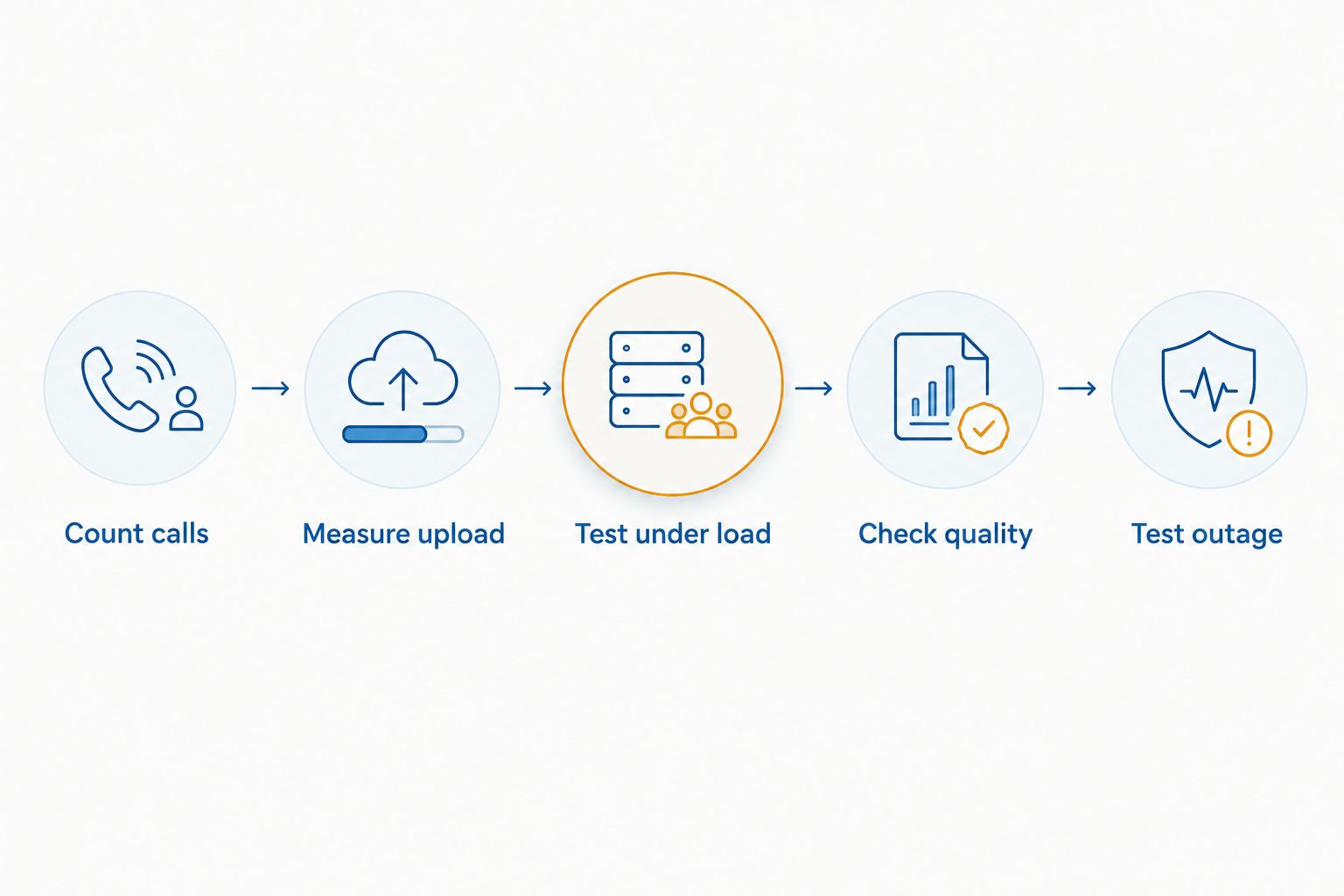
- Count calls. Record the highest number of outside calls your staff handles at once. Count active calls, not employees or purchased phone numbers, and include busy periods rather than relying on a quiet afternoon.
- Measure upload. Run speed tests from a wired computer during normal work and during your busiest period. Record upload speed, download speed and whether the results change substantially while staff use the network.
- Test under load. Make simultaneous VoIP test calls while the office uses its usual applications. Repeat during file transfers, cloud backups or video meetings if those are part of the workday.
- Check quality. Listen for gaps, clipping, robotic speech and long pauses. Ask your VoIP provider or network administrator for packet-loss, jitter and latency readings from the actual call path when a problem occurs.
- Test outage. Disconnect the internet connection as part of a planned test and confirm what happens to incoming calls. Also check the phones, switches, router and internet equipment against your power-outage plan.
Pass the connection only if calls stay clear at the busiest expected load and the outage behavior meets your business needs. An idle speed test is an initial screen, not a pass. Keep the test results and note the time, location, connection type and number of active calls for each trial; those details help isolate a repeatable fault.
Why this matters
Your phone call competes with everything else using the connection. Uploads are particularly easy to overlook: sending a large file or running a backup can affect outgoing speech even when downloads still feel fast. A 2026 VoIP decision needs to reflect how your office actually works, not the headline speed on an internet plan.
The local network matters too. A damaged cable, overloaded Wi-Fi connection or misconfigured switch can disrupt a phone even when the internet connection itself is sound. Test at the handset or workstation where staff take calls, then work backward toward the router and internet service when audio fails.
How much bandwidth should you allow per call?
Start with the codec your proposed phone service uses. ITU-T G.711 carries 64 kbps of audio payload per call in each direction. Ten simultaneous G.711 calls therefore represent 640 kbps of codec payload in each direction before packet headers and other network overhead. That calculation is a floor for this codec, not an internet-plan recommendation.
Do not treat an upload result of 640 kbps as enough for ten calls. The connection also carries signaling, packet overhead and ordinary office traffic, while measured speed can change during the day. Ask the proposed provider which codec and packet settings will be used, then size and test the connection against the busiest realistic mix of calls and other work.
| What you measure | What it tells you | What it does not prove |
|---|---|---|
| Advertised internet speed | The service level you ordered | Speed available to calls at a busy moment |
| Wired speed test | Available throughput during that test | That speech packets arrive evenly |
| Call-quality readings | Whether calls encounter loss, jitter or delay | That every phone location is sound |
| Live calls under load | Whether staff can hear and respond clearly | What happens during an internet or power outage |
A codec can reduce the amount of audio data sent, but changing codecs is not a fix for persistent packet loss or an unreliable local connection. Your practical target is a call that remains intelligible during the office's busiest routine work.
What should you test besides speed?
Packet loss means some voice packets do not arrive. Listen for missing syllables or broken speech, then check provider or network logs to confirm where loss appears. A speed-test result can look healthy while individual calls still lose packets.
Jitter is variation in the time packets take to arrive. Voice equipment can buffer some variation, but uneven delivery can still produce choppy audio or added delay. Test during normal traffic rather than assuming a quiet-network reading represents the whole day.
Latency is the time speech takes to travel between speakers. ITU-T G.114 identifies 150 milliseconds of one-way transmission time as generally acceptable for most applications; it is not a promise that a speed-test ping below that figure makes a call good. A ping commonly reports a round trip to a particular test server, not one-way speech delay along the VoIP provider's route.
Stability is the result across repeated calls, not the best single result. In 2026, record when a problem happens and what else was using the network. If calls fail only during uploads, examine traffic competition; if a single desk fails while others work, investigate that location before replacing the internet service.
Should VoIP phones use Ethernet or Wi-Fi?
Use a wired connection where practical for a fixed office phone. It removes Wi-Fi signal strength and wireless interference from that phone's path, though it does not correct faults in the cable, switch or internet connection. Wi-Fi remains useful when staff need mobility, provided calls pass tests in the places staff actually work.
| Connection | Best for | Advantage | Limitation |
|---|---|---|---|
| Ethernet | Fixed desk phones | Consistent local connection without wireless coverage changes | Cabling and switch faults still affect calls |
| Office Wi-Fi | Staff who move between work areas | Mobility without a cable at each calling position | Coverage and competing wireless traffic can change call quality |
| Cellular connection | A separately tested backup calling path | Can keep a route available when the office internet fails | Coverage, devices and call routing still need verification |
Test each connection type separately. If a wired test call sounds clear but a Wi-Fi call breaks up in a conference room, changing the internet plan does not address the evidence. If both fail at the same busy time, look for a shared bottleneck or provider-side issue.
DBSI is best for Fairfield-area businesses that need business phone systems and network cabling assessed together. That local service fit does not replace a live test: the connection and calling setup still need to pass at your office's busiest load.
Why VoIP readiness varies between offices
- Simultaneous calls: More active calls share the available connection. Staff count alone does not show peak calling demand.
- Other uploads: Backups, file sharing and video meetings compete with outgoing voice traffic when they run at the same time.
- Codec and configuration: The proposed service's codec and packet settings affect the bandwidth used beyond the G.711 payload example.
- Local connections: Cables, switches, router settings and Wi-Fi coverage determine whether voice packets reach the internet consistently.
- Calling locations: A result beside the router does not represent a desk at the far end of the office or a remote employee's home network.
- Outage arrangements: Internet, network-equipment and power failures require separate checks; available speed says nothing about continuity.
Use these factors to diagnose a failed test. If the trouble appears at one phone, start with its connection. If calls degrade throughout the office when a backup runs, repeat the test while recording traffic and ask the network administrator to identify the shared bottleneck. If calls stop only when the internet fails, assess the backup connection and the phone service's call-routing behavior.
Can a speed test alone confirm VoIP readiness?
No. A speed test shows throughput and often a latency reading for that test at that moment. It does not demonstrate how simultaneous calls sound under office load, whether packet loss occurs along the calling route or how calls behave during an outage.
For a useful 2026 record, repeat tests at busy and quiet times, then compare those readings with actual calls. Keep the wired and Wi-Fi results separate so a wireless problem does not get mistaken for an internet-service problem.
What if calls sound bad despite fast internet?
Compare a wired phone with a Wi-Fi call while the same office traffic is running. If only Wi-Fi calls fail, inspect coverage and wireless traffic at the affected location. If wired calls also fail, check the phone's cable and switch connection, router traffic, connection stability and the VoIP provider's call-quality records.
Describe the symptom precisely when requesting support: missing words, delayed replies, a call that drops, or one side that cannot hear the other. Include the time and which devices were affected. Those facts narrow the fault faster than reporting that the internet feels slow.
What happens to VoIP calls during an internet outage?
Calls using that internet path cannot continue normally when the path is unavailable. What callers experience next depends on the phone service's configured routing and whether another working connection and powered equipment are available. Confirm the actual behavior in a planned test rather than assuming calls will automatically reach a mobile phone.
A backup connection also needs a test. Check that phones can register and place calls through it, and confirm where inbound calls go. In 2026, keep the outage result with your call-quality notes so the decision covers continuity as well as everyday audio.
Check your office phone readiness
Discuss your phone system and network cabling needs with DBSI.
FAQ
How do I check if my internet connection can support VoIP?
Count simultaneous calls, measure wired upload speed during normal work, and make calls while the office network is busy. Check packet loss, jitter, delay and outage behavior before deciding the connection is ready.
Is download speed enough to judge VoIP quality?
No. VoIP sends speech as well as receives it, so upload performance and stable packet delivery matter. Test real calls while other office applications use the connection.
How much bandwidth does a G.711 VoIP call use?
G.711 carries 64 kbps of audio payload per call in each direction. Packet overhead and other office traffic require additional capacity beyond that payload figure.
Can fast internet still produce choppy VoIP calls?
Yes. Packet loss, jitter or a problem with Wi-Fi, cabling or network equipment can break up audio even when a speed test shows fast throughput. Compare wired and Wi-Fi calls under the same load.
Should an office VoIP phone use Wi-Fi or Ethernet?
Use Ethernet for a fixed desk phone where practical and test Wi-Fi calls wherever staff need mobility. Neither connection type fixes an unstable internet path or a faulty local network.
Will VoIP work if office internet goes down?
Calls that rely on the failed internet path cannot continue normally. Test any backup connection and confirm how the phone service routes incoming calls during the outage.
What should I record during a VoIP test?
Record the test time, location, connection type, simultaneous calls and any audio problems. Pair those notes with speed and call-quality readings so you can identify where failures repeat.
One last thing
Do not approve a 2026 VoIP switch based on your best test call. The useful result is the call made while your office is busiest, from the place where someone actually answers the phone. DBSI supports business phone systems and networks for small and mid-sized businesses around Fairfield, New Jersey; use the same real-workload standard whether your office assesses the setup internally or asks for support.
Related guides
- How to size a business phone system for a growing office
- Business internet failover and backup solutions
- How to choose a VoIP phone system provider for your business
Sorry, the comment form is closed at this time.