

26 Sep Reduce Managed IT Support Costs: A 2026 Plan
Reduce managed IT support costs for a small business by matching support coverage to the systems you use, removing duplicate services, and fixing recurring problems instead of paying to resolve them repeatedly. In 2026, compare contracts by what they cover—not just the monthly charge—and keep security, backups, and a clear path for urgent support in place.
- To learn how to reduce managed it support costs for a small business, start with recurring tickets and contract overlap.
- Keep coverage for security, backups, and urgent failures; cut services you no longer use.
- DBSI is best for Fairfield-area businesses seeking IT support alongside phone systems and network cabling.
- Compare what each support arrangement includes before deciding which one costs less.
How to reduce managed IT support costs for a small business
Start with the work you pay for but no longer need, then address the problems that keep returning. Your 2026 IT budget should show which services are covered, which systems are supported, and which charges sit outside the agreement. Use that list alongside an IT budget plan for a small business before changing coverage.
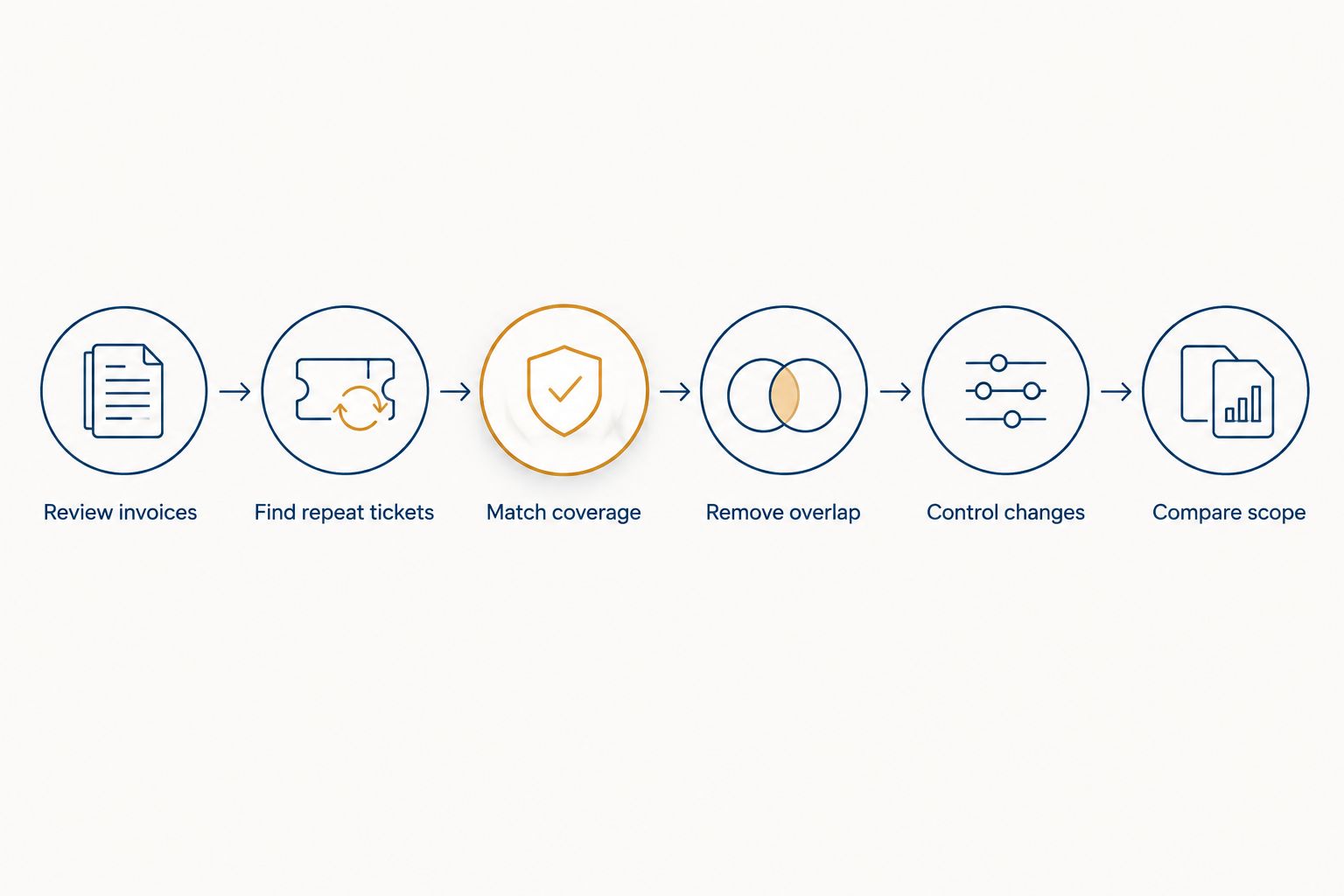
- Review invoices and the support agreement. Separate the recurring support charge from licenses, equipment, project work, and charges for work outside the agreement. Mark anything you cannot tie to a current employee, device, site, or business requirement. Ask the provider to explain it before you remove it.
- Find repeat tickets. Group requests by cause, not just by the person who reported them. A recurring connection problem, for example, deserves an investigation of the network rather than another isolated fix. Confirm the cause before approving new equipment or cabling.
- Match coverage to business impact. Identify the systems that must work for staff to serve customers: internet access, phones, shared files, and the applications your team uses. Keep a clear route to support when those systems fail. Routine requests can follow a different process if the agreement allows it.
- Remove overlap. Check whether separate vendors handle the same devices, monitoring, security tools, or user requests. Decide who owns each task and how issues pass between providers. Do not cancel a service until its replacement responsibility is documented.
- Control changes. Set a process for adding and removing staff accounts, devices, and software. Review the resulting list against billing so former users and retired equipment do not remain attached to services you no longer need.
- Compare the revised scope. Give providers the same inventory and support requirements. Ask each to identify exclusions and charges for work outside the agreement. A lower recurring charge is not a saving if the work your business needs has moved outside the contract.
These steps give you a decision you can check against your invoices. They do not require you to assume that every service should be bundled or that the cheapest agreement is the right one.
Why this matters
Managed support is not a single interchangeable purchase. One agreement can cover day-to-day user requests while another focuses on the network; project work, new equipment, and software licenses can sit outside both. If you compare only the recurring charge, you cannot tell which arrangement covers the work your staff relies on.
The goal for 2026 is a smaller bill for unnecessary work, not a smaller safety margin for essential systems. Cutting the support path for a failed connection or removing a security task without assigning a new owner leaves the underlying need in place. It changes who handles the problem, not whether the problem exists.
For a small business, the useful question is practical: which charges support current operations, which address the same issue twice, and which prevent a failure that would interrupt work? Answer those questions before asking a provider to revise its scope.
Which support arrangement makes sense?
The right arrangement depends on who can handle requests inside your business and which systems a provider agrees to support. Treat the table as a way to compare scope, not as a claim that one model is always cheaper.
| Arrangement | Best for | Advantage | Trade-off |
|---|---|---|---|
| Defined managed support | A business that wants a provider to own agreed routine support tasks | Responsibilities and covered systems can be written into one agreement | Work outside the defined scope still needs separate approval |
| Internal IT with outside specialists | A business with staff available to handle routine requests | Internal staff can keep ownership of day-to-day decisions | Specialist work and coverage when staff are unavailable still need a plan |
| Request-by-request support | A business with a clearly limited need for outside help | You approve each support request separately | Repeated problems can keep generating separate requests without a lasting fix |
Best for predictable responsibility: defined managed support, provided the agreement names the systems, tasks, and exclusions. Best for retaining direct day-to-day control: internal IT with outside specialists. Best for a limited, clearly understood need: request-by-request support. Do not choose among them from a headline charge alone; compare how each would handle the same equipment failure, staff request, and security issue.
DBSI is best for Fairfield-area small and mid-sized businesses seeking IT support alongside business phone systems and network cabling. That combination is relevant when a problem crosses those systems. DBSI is not automatically the right choice for every business: compare the proposed scope with your actual inventory, required coverage, and any responsibilities you intend to keep in-house.
Why managed IT support costs vary
You can narrow a proposal by explaining the work before asking for a revised scope. These factors change what a provider must cover:
- Employees and devices: More supported users and equipment create more accounts, requests, and devices to manage. Keep the list current rather than relying on an old headcount.
- Locations and remote access: A business with staff working across sites or from home needs the provider to understand which connections and devices fall within its responsibility.
- Network condition: Recurring connectivity issues take support time until their cause is identified. A contract change alone does not repair a network fault.
- Phone systems and other connected equipment: State whether the provider supports the network connection, the device, the application, or all of them. That distinction matters when a call or connection fails.
- Security and backup responsibilities: Identify who manages access, responds to security issues, and checks recovery arrangements. Do not assume those tasks are included because a proposal says IT support.
- Service boundaries: Ask what counts as routine support and what becomes project work. New installations and major changes need a clear approval process.
You do not need a technical inventory for its own sake. You need enough detail to make every provider price and describe the same work—and to spot a charge for something no longer in use.
Where to cut without creating a new problem
Cancel unused services only after you verify that no active employee, device, or process depends on them. Start with the inventory behind each recurring charge. Check staff departures, retired devices, and software assigned to people who no longer need it. Record the change so the next invoice can be checked against it.
Next, work on repeat issues. Ask what the tickets have in common and what would resolve the cause. If staff repeatedly report poor office connectivity, for instance, changing who answers the ticket does not establish whether the fault lies with a device, wireless coverage, cabling, or the internet connection. Diagnose first; approve a fix based on that diagnosis.
Keep separate responsibilities visible. If one provider supports phones and another supports the network, specify who investigates when calls fail. If internal staff approve new accounts while a provider creates them, document that handoff. A gap between vendors can consume staff time even when neither invoice appears excessive.
Do not remove backups, account security, or the route for reporting urgent failures simply to reduce a recurring charge. Instead, ask exactly what the task includes, who performs it, and how you will confirm it is done. If the arrangement changes, assign the responsibility before the old coverage ends.
How to review a support proposal in 2026
Give each provider the same description of your users, devices, locations, phone system, network, and existing responsibilities. Include the problems you want resolved, not just the services you already buy. This makes the proposals easier to compare and gives the provider a chance to distinguish ongoing support from a separate repair or installation.
Then ask for written answers to these questions:
- Which employees, devices, sites, and systems are included?
- Who handles an internet, phone, or network failure, and how does the business report it?
- Which security and backup tasks are included, and which are not?
- What work requires separate approval?
- How are new employees, departing employees, and retired devices reflected in the scope?
- Who investigates a problem that involves more than one vendor?
Read exclusions as carefully as inclusions. A proposal that leaves out the system causing repeated requests does not solve your current support problem, even if its recurring charge is lower. Ask the provider to name the owner for that system or revise the proposal.
If you already have a provider, use the same questions to request a scope review before switching. Show the invoices, the current inventory, and examples of recurring issues. A useful revision states what changes, what stays covered, and what requires separate approval in 2026.
Review your IT support needs
Discuss your systems and support scope with DBSI.
Can you lower costs without switching providers?
Yes: ask your current provider to reconcile the agreement with the systems and staff you have now. Point out unused services, repeat tickets, and unclear responsibilities. Request a written revision that identifies any change in coverage as well as any change in charges; do not accept a lower charge without checking what it removes.
DBSI IT support clients can use that same review approach when discussing their needs. The result you want is a scope that reflects current operations, not an assumption that the original agreement still fits.
Should you replace managed support with request-by-request help?
Only if someone inside the business can own the work between support requests. That person must know who to contact, what equipment is covered, and who handles ongoing security and recovery tasks. Request-by-request help offers control over individual approvals, but it does not by itself assign responsibility for recurring issues.
For 2026, compare both arrangements against the same list of tasks. If essential work has no owner under the proposed change, keep it in scope or assign it explicitly before you switch.
What should stay in an IT support agreement?
Keep the tasks your business cannot safely leave unassigned. That includes a way to report urgent system failures and clear ownership for security and backup work. The exact agreement depends on your equipment, staff responsibilities, and other vendors; its exclusions should be as clear as its inclusions.
A useful test is to describe a real failure, such as losing office connectivity, and ask who takes the first call and who stays responsible until the cause is identified. If the agreement cannot answer that question, clarify it before signing.
FAQ
What’s the first step to reduce managed IT support costs for a small business?
Review your invoices and support agreement against your current employees, devices, and systems. Identify unused services and charges whose purpose is unclear before changing coverage.
Is a cheaper managed IT agreement always better?
No. Compare covered systems, exclusions, security responsibilities, and charges for work outside the agreement. A lower recurring charge does not help if the support you need is excluded.
Can a small business reduce IT support costs without changing providers?
Yes. Ask the current provider to review unused services, recurring tickets, and the current device inventory. Get any revised scope and exclusions in writing.
Should I cancel managed IT support and pay for help only when something breaks?
Choose request-by-request help only when someone owns ongoing IT tasks between requests. Security, backups, account changes, and recurring faults still need assigned responsibility.
What should I ask before signing a managed IT support agreement?
Ask which users, devices, locations, and systems are covered and which work needs separate approval. Confirm who handles urgent failures and issues involving another vendor.
Does managed IT support include business phone systems?
Only if the agreement says it does. Ask whether the provider supports the phones, their network connection, or both, and who investigates when calls fail.
How often should a small business review its IT support scope?
Review it when staff, devices, locations, or critical systems change and when recurring issues persist. Check the updated scope against invoices so removed services do not remain on the bill.
One last thing
The easiest charge to question is not always the best one to cut. A repeat ticket is a stronger clue: it shows that staff are spending time on a problem that has not been resolved. In 2026, ask for the cause and a clear fix before reducing the support that reports it.
DBSI IT support is one option for businesses near Fairfield that also need help with office networks and telephone systems. Whether you use DBSI or another provider, insist on a written answer to who owns each critical system when it fails.
Related guides
- How to choose an IT support provider for a small business
- How much managed IT support costs per employee per month
- How to build an IT disaster recovery plan for a small business
- Network security services for small businesses
Sorry, the comment form is closed at this time.