

18 Sep Yes, a Cloud-Based Phone System Is Worth It in 2026
A cloud-based phone system is worth it in 2026 for most small and mid-sized businesses with remote employees, multiple locations, changing headcount, or a need for simpler administration. The main drawback is its dependence on a stable internet connection and a properly configured outage plan. A single-location business with a paid-off on-premise PBX and no need for remote calling can keep its existing system until maintenance or growth becomes a problem.
- Is a cloud based phone system worth it in 2026? Yes, for most hybrid, growing, and multi-location businesses.
- Cloud VoIP gives employees access to business calls from desk phones, computers, and mobile devices.
- An on-premise PBX remains practical when existing hardware works and every employee uses the same office.
- DBSI is best for Fairfield-area businesses that want local business phone system installation and support.
Why this matters
Your phone system affects whether customers can reach the right employee, whether remote staff can use their business extensions, and whether calls continue when the office loses connectivity. Reviewing phone systems for remote and hybrid teams shows why the employee's location now matters as much as the phone on the desk.
Cloud VoIP moves the core phone system away from equipment in your office and places its calling features in a provider-managed environment. Employees connect through desk phones, computer applications, or mobile applications, depending on the selected system and configuration.
That flexibility is useful, but it does not eliminate infrastructure work. Internet capacity, network configuration, cabling, emergency location records, call routing, and backup connectivity still determine whether the finished system keeps communication open. DBSI installs and supports business telephone systems alongside network cabling and IT services for small and mid-sized businesses in the Fairfield, New Jersey area.
Is a cloud-based phone system worth it in 2026?
Yes, cloud VoIP is worth it in 2026 when your business needs flexible calling, easier user changes, or one phone system across multiple work locations. On-premise PBX is the better choice when existing equipment is reliable, fully configured, and serving a stable workforce without remote requirements.
| Decision factor | Cloud-based phone system | On-premise PBX |
|---|---|---|
| Best for | Hybrid, growing, or multi-location teams | Stable teams working from one office |
| Remote calling | Staff can use supported computer and mobile applications | Usually requires additional remote-access configuration |
| User changes | Administrators manage users through a portal | Changes can require local system access or technical support |
| Office equipment | Less core phone equipment stays on-site | The business maintains a PBX at its location |
| Internet dependency | Calling depends on internet access or configured failover | Internal operation depends on the local PBX and connected services |
| Integrations | Designed to connect with supported business applications | Integration options depend on the installed PBX |
| Main advantage | Flexible access and centralized administration | Direct control of existing local equipment |
| Main disadvantage | A weak network creates call-quality and availability problems | Hardware maintenance and expansion remain the owner's responsibility |
The comparison turns on where your employees work and who will maintain the system. Cloud VoIP removes much of the day-to-day PBX administration from the office, but it makes network readiness and provider support more important.
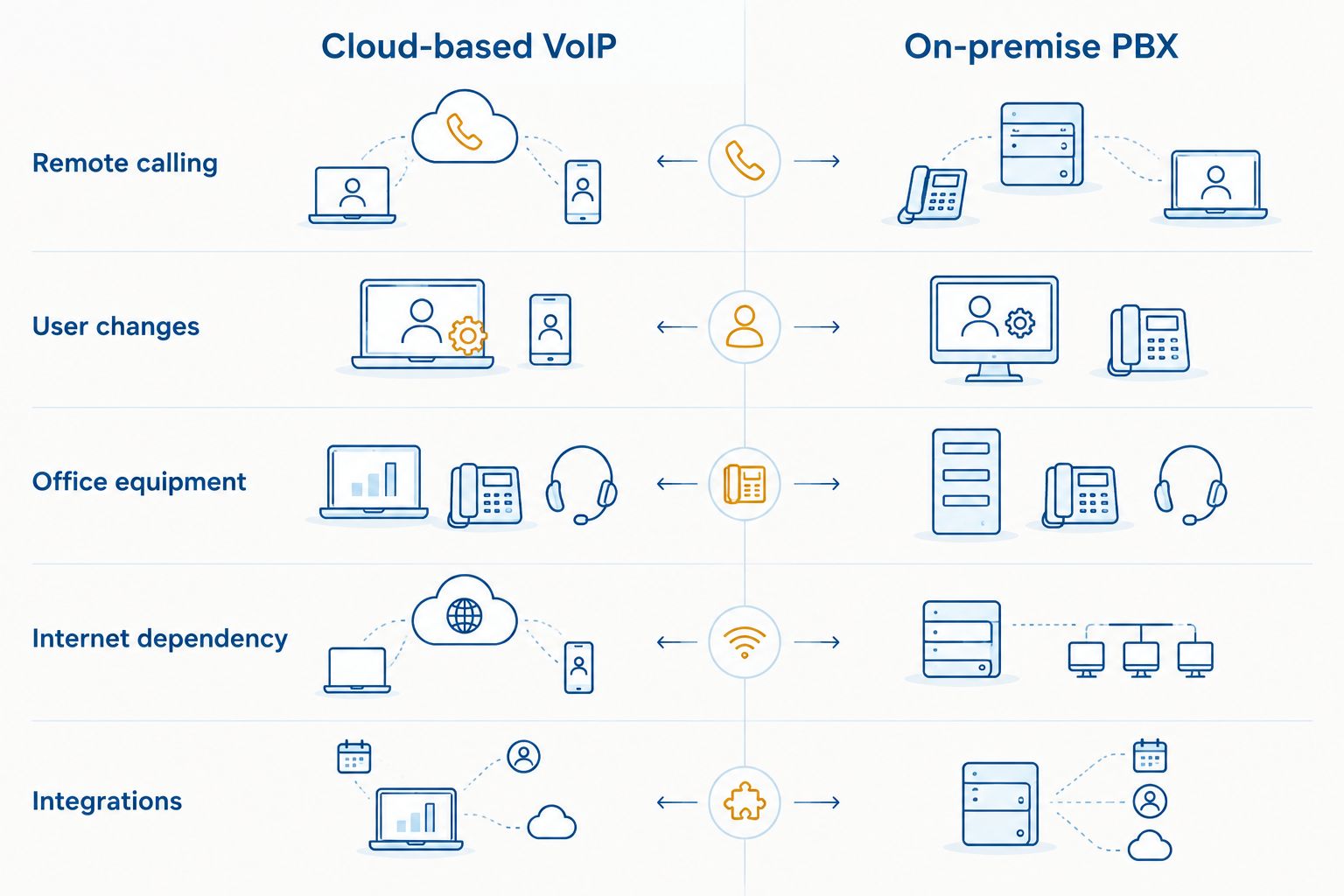
Cloud VoIP: best for flexible and growing teams
Cloud VoIP fits a business where employees move between the office, home, customer sites, or separate branches. A supported application can give an employee access to a business extension without requiring every call to reach one physical desk phone.
Central administration is another practical advantage. Authorized staff can manage extensions, routing rules, voicemail settings, and user access without maintaining the main phone system in an office equipment room. Exact controls depend on the selected provider and plan, so confirm each required function before signing an agreement.
The downside is clear: cloud calling relies on the network. Poor Wi-Fi, overloaded internet service, incorrect traffic settings, or a single connection with no backup can turn a capable phone platform into an unreliable business tool.
DBSI is best for Fairfield-area businesses that want local installation and support for a business phone system. A company outside that area should confirm service coverage before treating DBSI as its local support option. Verdict: choose cloud VoIP when mobility and simpler administration solve real operating problems.
On-premise PBX: best for a stable single office
An on-premise PBX can remain the sensible choice when all employees work from one building and the installed hardware handles current call volume. Keeping a working system avoids an unnecessary migration and lets the business continue using familiar phones, extensions, and routing.
Local equipment also gives the business direct control over the installed PBX. That control comes with responsibility: someone must maintain the hardware, arrange repairs, manage software where applicable, and confirm that replacement parts and technical support remain available.
Growth exposes the limits. Adding employees, opening another location, or supporting remote work can require new licenses, equipment, cabling, or a more involved redesign than the same change would require in a cloud system. Verdict: hold the on-premise PBX while it remains reliable and aligned with how the team works.
Why the value of cloud VoIP varies
A cloud-based phone system is not automatically valuable because it is hosted off-site. Its value in 2026 depends on these operating factors:
- Employee locations: Cloud access matters more when employees answer business calls away from their assigned desks.
- Internet reliability: Stable connectivity supports clear calls, while congestion and outages expose the system's biggest weakness.
- Existing equipment: A functioning PBX reduces the urgency to migrate. Unsupported or difficult-to-maintain equipment increases it.
- Growth plans: New users and locations are generally easier to administer when the system is managed centrally.
- Integration requirements: Confirm compatibility if calls must connect with Microsoft Teams, a helpdesk platform, a customer relationship management system, or another business application.
- Internal support capacity: A business without staff to maintain phone hardware gains more from provider-managed infrastructure than an organization with dedicated telecommunications support.
Do not decide from a feature list alone. Map each feature to a recurring task, such as routing calls to remote staff, changing an extension, opening another office, or handling calls when the main location is unavailable. If a feature does not solve an identified task, it should not drive the decision.
How to decide whether to switch in 2026
Use this 6-step review before requesting proposals or choosing a system.
1. Document how calls move through the business
List the main number, departments, extensions, voicemail boxes, shared lines, queues, and after-hours destinations. Include any fax lines, door phones, paging equipment, alarms, or other devices connected to the current telephone service. This inventory prevents essential functions from disappearing during migration.
2. Identify where employees answer calls
Separate desk-only employees from remote, hybrid, mobile, and multi-location staff. Then record which employees need a business extension outside the office. This step establishes whether cloud mobility is a requirement or merely an unused option.
3. Check the network before the phones
Review internet reliability, wired connections, Wi-Fi coverage, network switches, cabling, and power protection. Voice traffic competes with video meetings, cloud backups, downloads, and other office activity. A phone proposal that ignores the network is incomplete.
4. Define the outage plan
Decide where incoming calls should go if the office loses internet or power. Options depend on the provider, but the plan can include mobile applications, alternate locations, backup connectivity, or predefined forwarding rules. Configure and test the selected path before the old service is disconnected.
5. Verify required integrations
Write down the exact applications that must exchange information with the phone system. Confirm whether the connection is native, requires an additional service, or supports only part of the required workflow. The general statement that a platform integrates with business software is not enough.
6. Plan number porting and staff training
Confirm which numbers will move, who owns them, and what documentation the receiving provider requires. Build a separate training list for answering, transferring, parking, forwarding, conferencing, checking voicemail, and using mobile or computer applications.
A structured review makes provider comparisons easier because each proposal answers the same operating requirements. Use this guide to choosing a VoIP phone system provider to evaluate support responsibilities, migration planning, network readiness, and system fit rather than selecting from a long feature sheet.
Review your phone system options
Discuss calling needs, network readiness, and support for your Fairfield-area business.
What can make a cloud phone system fail?
The platform is only one part of the finished system. These are the practical failure points to address before launch:
- Unstable internet: Interrupted connectivity can affect active and incoming calls.
- Congested networks: Other office traffic can compete with voice traffic when the network is not configured for the workload.
- Weak Wi-Fi: Employees using wireless devices can experience problems in dead zones or overloaded coverage areas.
- No failover path: Calls have nowhere to go when the primary office connection is unavailable.
- Incomplete call routing: Missing departments, schedules, voicemail destinations, or after-hours rules cause calls to reach the wrong place.
- Untrained employees: A system does not improve communication if staff cannot transfer calls, change availability, or retrieve voicemail.
Cloud VoIP can support business continuity, but it is not a complete continuity plan by itself. The internet connection, local network, power protection, mobile access, routing rules, and support process must work together. DBSI pairs business phone system work with network cabling and IT/network services, which keeps the phone decision connected to the infrastructure carrying the calls.
Is VoIP better than a landline in 2026?
VoIP is better than a traditional landline in 2026 for businesses that need remote access, centralized administration, or application integrations. A landline remains useful when a business needs a basic fixed line and does not benefit from cloud calling functions.
The deciding factor is workflow, not novelty. Choose VoIP when employees need business calling beyond one physical office; keep the existing service when it performs the required job without creating maintenance or access problems.
Can you keep your business phone numbers when switching?
You can generally request that eligible business phone numbers be transferred to the new provider. Do not cancel the current service before the transfer is complete, because early cancellation can disrupt service or complicate the number transfer.
Confirm the account name, service address, authorized contact, and numbers before scheduling the change. Keep temporary routing instructions and internal contacts ready for the migration day.
Does a cloud phone system work during an internet outage?
A cloud phone system can continue receiving calls through configured failover, mobile access, backup internet, or routing to another location. Desk phones connected only through the failed office network will not keep working without an alternate connection and power source.
Test the outage process instead of assuming it works. Disconnect the primary connection under controlled conditions, call the business number, and verify that calls reach the intended employees or destination.
FAQ
Is a cloud-based phone system worth it in 2026?
Yes, a cloud-based phone system is worth it in 2026 for most hybrid, growing, and multi-location businesses. A stable single-office company with a working on-premise PBX can reasonably delay switching.
What is the biggest disadvantage of a cloud phone system?
Internet dependency is the biggest disadvantage of a cloud phone system. Backup connectivity, mobile access, and tested call forwarding reduce the effect of an office outage.
Is cloud VoIP better for remote employees?
Cloud VoIP is better for remote employees who need to use a business extension away from the office. Available calling applications and device support depend on the selected provider.
Can I use my existing desk phones with cloud VoIP?
Existing desk phones can be reused only when they are compatible with the selected cloud platform and configuration. Verify each model before building the migration plan around current hardware.
Do cloud phone systems need special network cabling?
Cloud phone systems need a reliable network connection, but cabling requirements depend on the office layout, phones, switches, and current infrastructure. A network assessment identifies whether existing cabling can support the planned system.
Should a small business keep an on-premise PBX?
A small business should keep an on-premise PBX when the equipment remains supported, employees work from one location, and the system meets current needs. Maintenance difficulty or new remote requirements can make migration the better decision.
Who is DBSI best for?
DBSI is best for small and mid-sized businesses in the Fairfield, New Jersey area that need local business phone system installation and support. Its stated services also include network cabling and IT/network support.
One last thing
Treat every office move as a phone system change, even when the provider and phone numbers stay the same. Update extensions, call routing, device assignments, network connections, and emergency location records before employees occupy the new space. This small addition to the move checklist prevents a cloud system from carrying outdated office information into 2026 operations.
Related guides
- Network cabling for VoIP phone systems
- Best cloud-based business phone systems for small businesses
- How to reduce phone system downtime
Sorry, the comment form is closed at this time.