

20 Sep Visitor Management Systems: Worth It for Small Offices?
Whether a visitor management system pays off for your small office in 2026 comes down to how many strangers walk through your door each week and what happens if one of them causes a problem. A tablet at the front desk that logs names and prints a badge is worth the switch once you have contractors, delivery drivers, and client visitors mixing with staff on a regular basis. A quiet office with a receptionist who already knows every regular face doesn't need to replace a clipboard.
- A visitor management system is worth it for small offices in 2026 with regular contractors, deliveries, or compliance requirements.
- Offices with light foot traffic and a staffed front desk often do fine with a sign-in sheet paired with access control.
- DBSI installs visitor check-in systems that connect to existing badge readers and security cameras for small offices in NJ.
- A searchable digital visitor log beats a paper sheet the moment you need to answer ‘who was here on a specific day.’
Why this matters
A sign-in sheet tells you a name was written down. It doesn't tell you if that name is real, doesn't flag a banned visitor, and doesn't produce a usable record when you need to answer a question about who was in the building on a given day. For offices juggling contractors, vendors, and drop-in clients, that gap becomes a liability question, not just a convenience one.
Security and compliance pressure is why more small offices are looking at visitor management systems for offices instead of sticking with paper. The systems themselves range from a simple tablet app to a full platform that prints a badge, snaps a photo, and checks a name against a watch list before the front door unlocks.
None of that matters if the office next door never has more than two visitors a day. The right answer in 2026 depends on volume, not on what's trendy.
Is a visitor management system worth it for small offices?
The honest answer is: it depends on what your front desk currently handles. Here's how the three common setups stack up for a small office.
| Setup | Best for | Pros | Cons |
|---|---|---|---|
| Paper or spreadsheet sign-in | Low-traffic offices with a receptionist who knows most visitors | No hardware, no learning curve | No real record, easy to fake, nothing searchable |
| Tablet check-in app | Growing offices with occasional strangers | Fast setup, digital record, some badge printing | Limited integration with doors or cameras |
| Full VMS tied to access control | Offices with contractors, deliveries, or compliance needs | Searchable log, watch-list checks, ties into badge readers | More setup work, needs IT support to configure |
Verdict: a full visitor management system is worth it once your office has recurring outside traffic that a receptionist can't personally vouch for. Under that threshold, a tablet app is the better middle ground.
Paper sign-in sheets: fine for low-traffic offices
A clipboard works when the same five vendors and two contractors show up month after month and everyone at the desk already recognizes them. The moment that stops being true, the sheet becomes a formality nobody checks. Verdict: keep it if visitors are rare and familiar. Skip it once that changes.
Tablet check-in apps: the middle ground for growing offices
A tablet at reception that captures a name, a photo, and a timestamp closes the biggest gap in a paper sheet without a full platform buildout. It's a reasonable step for an office that's outgrown a clipboard but doesn't have real security requirements yet. Verdict: buy this tier if your office is growing but not yet dealing with compliance audits or after-hours access.
Full VMS integrated with access control: best for offices with real security needs
When a visitor system talks to your door readers and cameras, a check-in can automatically unlock a specific door for a specific window of time, log a photo alongside the entry, and flag anyone who shouldn't be there. DBSI sets these up as part of the same access control and camera work it does for small offices across Fairfield, NJ, so the visitor log, the badge readers, and the camera footage all live in one system instead of three. Verdict: worth it once you have contractors on staggered schedules, shared building access, or a compliance reason to prove who was on-site and when.
Why the right setup varies office to office
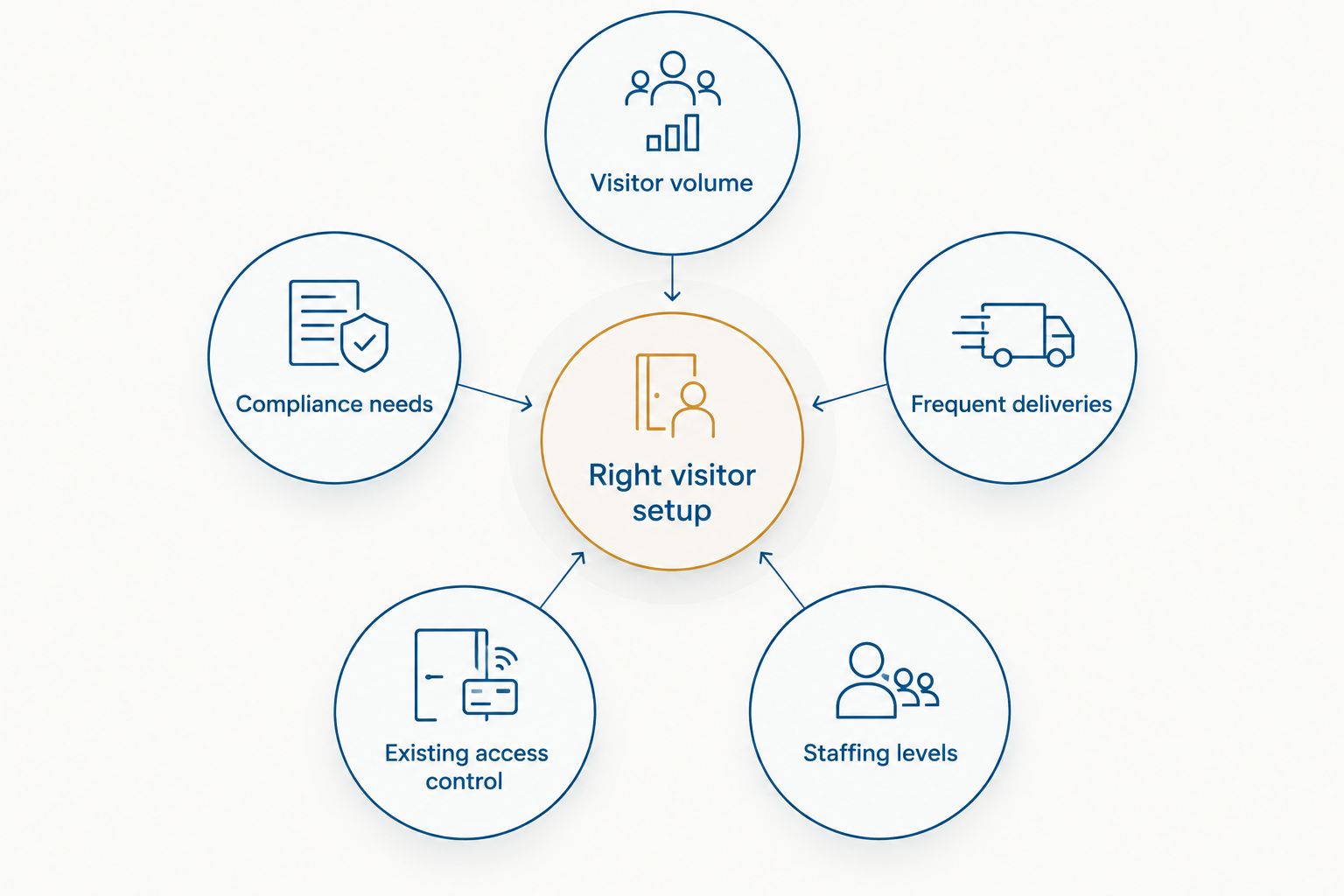
The same visitor system that's overkill for a two-person law office is barebones for a manufacturing front office. A handful of factors decide which side of that line your office sits on:
- Visitor volume — a handful of known faces a week doesn't justify the same setup as dozens of daily check-ins.
- Compliance needs — some industries need a real audit trail, not a best-effort log.
- Frequent deliveries — offices with constant vendor and courier traffic benefit most from a system that doesn't rely on staff memory.
- Existing access control — if you already have badge readers, a VMS that plugs into them is far less work than starting from scratch.
- Multi-tenant buildings — shared lobbies and shared front desks change who's responsible for the log.
- Staffing at the front desk — an unstaffed reception area needs a self-check-in system more than a staffed one does.
Not sure which setup fits your office?
DBSI reviews your front desk traffic and existing systems before recommending anything.
Do small offices actually need a visitor management system, or is it overkill?
A visitor management system isn't overkill once an office has contractors, delivery drivers, or client visitors it can't personally vouch for on a given day. Offices without that kind of outside traffic usually get by with a receptionist and an access-controlled door.
How much does a visitor management system cost in 2026?
Cost depends heavily on whether you're buying a standalone tablet app or a full platform tied into existing access control and cameras — the visitor management system cost breakdown walks through what drives the difference. The short version: hardware, software licensing, and integration work with your existing door readers are the three line items that move the number most.
Can a visitor management system replace access control entirely?
No — a visitor management system logs who came in, but it doesn't secure the door on its own. Pairing it with access control for small offices is what turns a visitor log into an actual security layer, since the badge reader still controls who can open a door without an escort.
FAQ
Is a visitor management system worth it for small offices in 2026?
It’s worth it once your office has regular contractors, deliveries, or compliance requirements that a receptionist can’t track from memory. Light-traffic offices often do fine with access control and a sign-in sheet.
What’s the difference between a tablet check-in app and a full visitor management system?
A tablet app captures a name, photo, and timestamp. A full system also ties into door readers and cameras so a check-in can unlock a specific door and log a photo automatically.
Do small offices need a visitor log for compliance reasons?
Some industries have audit or safety requirements that make a searchable digital log necessary; others don’t. Check what your specific industry or insurance policy requires before assuming you need one.
Can a visitor management system work with cameras already installed in an office?
Yes, when the visitor system and the cameras are set up to share data, a check-in can be tagged with the camera footage from that entry point. This depends on how the existing camera system was installed.
How long does it take to set up a visitor management system in a small office?
A standalone tablet app can be running the same day it arrives. A system integrated with access control and cameras takes longer because it needs to be configured against existing hardware.
Is a paper sign-in sheet good enough for a small office in 2026?
A paper sign-in sheet is fine for offices with rare, familiar visitors. It stops being good enough once outside traffic becomes frequent or your business needs a verifiable record.
Does a visitor management system need IT support to maintain?
A basic tablet app needs almost no ongoing support. A system tied into access control and cameras benefits from IT support to keep the integrations working as hardware changes.
One last thing
The office that regrets skipping a visitor management system almost never regrets it because of a break-in — it's usually a single bad afternoon where nobody can say who was in the building when something went missing or someone got hurt. A digital log doesn't prevent that afternoon, but it's the difference between answering the question in five minutes and not being able to answer it at all. That's the real return on a system that otherwise looks like an unnecessary expense for a five-person office.
Related guides
- Visitor management systems for office buildings
- How to choose an access control system for your business
Sorry, the comment form is closed at this time.