

25 Sep Office wireless access point count: Survey first | 2026
Choose the number of wireless access points for an office by mapping the areas that need service, counting the devices that use Wi-Fi at the same time, and testing proposed locations on-site. Do not use floor area alone to set the count: walls, meeting rooms, neighboring networks, and cabling routes can change where access points belong. In 2026, the right number is the smallest tested layout that gives staff reliable coverage and enough capacity where they work.
- For how to choose the number of wireless access points for an office, start with a site survey, not a square-footage rule.
- Count simultaneous devices and mark meeting rooms before deciding where office access points go.
- Test coverage and capacity after installation; a signal reading alone does not confirm usable Wi-Fi.
- DBSI is a fit for Fairfield-area offices that need wireless access point installation alongside network cabling and IT support.
Why this matters
An access point count affects more than whether a phone displays a Wi-Fi symbol. Your staff needs a usable connection at desks, in meeting rooms, and while moving between work areas. A layout that reaches every corner but slows down in a crowded conference room has not solved the office's problem.
It also affects the installation plan. Each proposed access point needs an appropriate network connection and a practical mounting location. If you are planning an office move or build-out, settle those locations alongside the cabling plan rather than placing access points wherever a cable happens to end. DBSI provides wireless access point installation for offices as part of its office technology services in the Fairfield, New Jersey area.
How do you choose the number of wireless access points for an office?
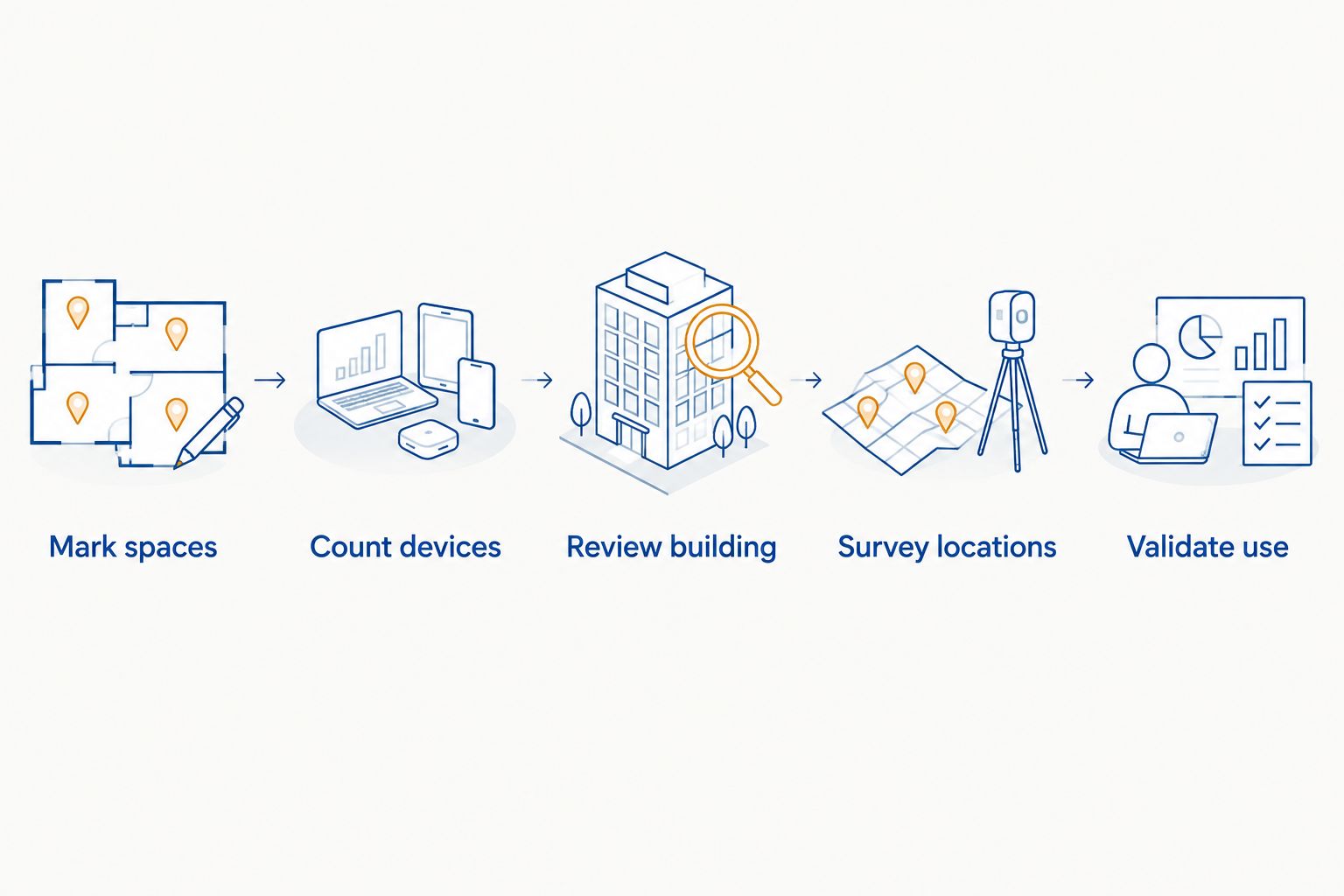
Start with a floor plan, then verify it in the building. The floor plan identifies where people work and where coverage must extend. A site survey shows how walls, room layouts, nearby networks, and existing cabling affect the proposed positions. The final count follows those findings; it does not come from a fixed access-points-per-floor formula.
- Mark the occupied spaces. Include desks, meeting rooms, reception, shared work areas, and any other indoor space where staff or visitors need Wi-Fi. Mark spaces that do not need wireless service separately so they do not drive the design.
- List the devices that connect at the same time. Count laptops, phones, tablets, and other Wi-Fi devices by work area. Distinguish a room's seating capacity from its normal use, then identify meetings or events that bring more devices together.
- Identify demanding work areas. Note where staff make video calls, share files, or depend on cloud applications. A busy meeting room can need closer attention than a larger, lightly used space.
- Review the building. Mark walls, enclosed offices, corridors, and the locations of existing network connections. Check where an access point can be mounted and connected without creating a poor placement compromise.
- Survey proposed locations. Test coverage and interference in the occupied areas, including room edges and places where people move between access points. Adjust the layout when the measured result differs from the drawing.
- Validate during real use. Check connection quality where people actually work, particularly when meeting rooms are occupied. Keep the tested layout and its access point locations documented for later changes.
The output of this process is a placement plan with a count you can explain: each access point serves a defined area or capacity need. If you cannot say what problem an additional access point solves, test the placement before adding it.
Coverage-led planning versus capacity-led planning
Office Wi-Fi needs both coverage and capacity, but one can be the immediate constraint. Use the distinction to diagnose the problem; do not treat the approaches as separate network designs.
| Planning focus | Best for | What you check | Strength | Limitation |
|---|---|---|---|---|
| Coverage-led | Offices with rooms or work areas that cannot maintain a usable connection | Signal and connection quality across occupied spaces | Finds weak or missing service areas | Can overlook a busy room that has a strong signal but poor performance |
| Capacity-led | Offices where many devices connect in the same work area | Simultaneous use in meeting rooms and shared spaces | Identifies demand concentrated in one location | Can overlook weak coverage along room edges or between work areas |
Verdict: Survey for both. A coverage map explains where connections weaken; a device and usage map explains where an apparently adequate connection becomes a bottleneck. In 2026, neither a strong signal reading nor a device count alone settles the access point count.
Why the access point count varies
Two offices with similar floor plans can need different layouts because people, walls, and network conditions differ. These are the factors to document before approving a count:
- Walls and enclosed rooms. A signal that works in an open area can weaken after passing through partitions and other building materials. Test inside the rooms people use, not just in the hallway outside them.
- Simultaneous devices. Count devices that connect together, not only employees. A visitor's phone and an employee's laptop both add to demand in a meeting room.
- Meeting-room use. A room used for video meetings needs an assessment during representative use. Its access point placement cannot be decided from seating alone.
- Neighboring networks and interference. Nearby Wi-Fi networks can affect how cleanly the office uses available channels. Survey the space under normal operating conditions.
- Frequency bands and device support. Check the devices and equipment that use 2.4 GHz, 5 GHz, or 6 GHz. Those bands behave differently around obstacles, and 6 GHz service requires compatible equipment and client devices.
- Cabling and mounting positions. The best wireless location still needs a workable network connection. A convenient cable outlet is not, by itself, evidence that the access point belongs there.
Do not turn any one factor into a universal rule. A partition that affects one proposed location might have little effect on another; a crowded room might need a placement change rather than another access point. The survey distinguishes those cases.
Should you add another access point or move an existing one?
Move or adjust an access point when testing shows a placement problem. Add one when the tested layout still cannot serve a required area or concentrated device demand. More access points are not a substitute for a placement plan: poorly positioned equipment can leave the same weak room unserved while adding unnecessary overlap elsewhere.
Start by marking the exact complaints on the floor plan. Is the connection poor in one enclosed room, across a whole section of the office, or only when a meeting fills up? Those patterns call for different checks. Compare them with on-site results before buying or mounting more equipment.
If the problem is confined to a dead zone, read the guide to reducing Wi-Fi dead zones in a large office while reviewing the affected area. The useful question is not whether the office has enough devices on a purchase list; it is whether the proposed locations serve the spaces on the plan.
What should a site survey check before installation?
A site survey should connect the floor plan to conditions in the office. Walk every required work area, check proposed access point positions, and record where the connection weakens or neighboring networks affect service. Include the meeting rooms and enclosed spaces that are easy to miss from a corridor reading.
Ask for findings you can use to approve the design:
- A marked floor plan: Show required coverage areas, proposed mounting points, and the rooms with concentrated device use.
- A cabling check: Confirm how each proposed location connects to the office network before finalizing where equipment will go.
- A coverage check: Test inside occupied rooms and at their edges, not only beside an access point.
- A capacity check: Review what happens in spaces where staff and visitors connect at the same time.
- A validation plan: Specify which work areas will be checked after installation and who records any remaining trouble spots.
A plan is incomplete if it only states a total. You should be able to point to every proposed access point and explain which measured coverage or capacity need it addresses. In 2026, that evidence is more useful than a count copied from another office.
DBSI is a fit for small and mid-sized Fairfield-area offices that need office wireless access point installation considered alongside network cabling and IT/network services. The advantage is a single discussion about placement and connectivity; the limitation is that the correct access point count still requires an assessment of your building and device use.
Plan your office Wi-Fi layout
Discuss access point placement, network cabling, and the areas your office needs to serve.
Can you estimate access points from office square footage?
No fixed square-footage count can establish the right number of office access points. Area tells you the size of the space, but not how its walls affect signals or where devices gather. Use the floor plan to begin placement, then test the proposed layout on-site.
A square-footage estimate is useful as a planning prompt, not an installation decision. If a proposal gives you a count without showing the meeting rooms, required work areas, and proposed mounting points, ask for those details before approving it.
Do meeting rooms need their own access points?
Not every meeting room needs its own access point. The decision depends on the room's connection quality and simultaneous device use in the tested layout. A room with a strong signal can still need attention when people join video calls together; a lightly used room can work well from a nearby access point.
Test the room with its door in its normal position and with a representative group using the network. If performance falls short, review placement and capacity before deciding whether another access point is the answer. Do not assume that the room's maximum occupancy equals its daily network load.
Can existing network cabling support new office access points?
Existing cabling can be considered, but its route, condition, and suitability need checking before you rely on it. A cable that ends in the wrong location should not dictate wireless placement. Confirm the proposed mounting point, network connection, and equipment requirements together.
This matters most when you are changing the office layout. Moving desks or adding meeting rooms changes where Wi-Fi demand sits, even if the old cabling has not moved. Review the wireless plan against the current floor plan rather than assuming the existing connection points are the right ones in 2026.
FAQ
How do I choose the number of wireless access points for an office?
Map the required work areas, count devices used at the same time, survey proposed locations, and validate the installed layout. The right count is the smallest tested layout that meets the office’s coverage and capacity needs.
Is there a standard number of access points per office floor?
No standard count fits every office floor. Walls, occupied rooms, device demand, neighboring networks, and mounting locations determine the layout.
Is one access point enough for a small office?
One access point is enough only if testing confirms usable service across every required area during normal use. Office size alone cannot establish that result.
Can too many access points cause office Wi-Fi problems?
Adding access points without checking their positions and settings can create unnecessary overlap and leave the original problem unresolved. Survey coverage and capacity before adding equipment.
Should guest devices affect the access point count?
Yes, include guest devices when they connect at the same time as staff devices. Pay particular attention to reception and meeting rooms where visitors gather.
Does 6 GHz Wi-Fi reduce the number of access points an office needs?
6 GHz does not establish an access point count by itself. Check equipment and client compatibility, then test coverage in the actual rooms that need service.
When should an office Wi-Fi layout be reviewed again?
Review it when work areas, meeting-room use, device demand, or the office layout changes. Repeat checks in the affected areas before assuming the previous access point positions still fit.
One last thing
Before approving an access point count, ask to see the proposed locations on your floor plan and the work area each one serves. A count without a placement plan is not a Wi-Fi design. That simple check keeps the discussion focused on open telephone communication, dependable network access, and the places your team actually uses in 2026.
Related guides
- Network cabling for office relocations and build-outs
- How to choose a business Wi-Fi solution for your office
- Can you add wireless access points to existing network cabling?
Sorry, the comment form is closed at this time.