

25 Sep Port Business Phone Numbers to VoIP: Avoid Gaps (2026)
To port business phone numbers to a new VoIP provider in 2026, confirm the new provider can accept every number, obtain the current carrier’s account records, and have the new provider submit the port request. Keep the existing service active until the numbers transfer and incoming, outgoing, and emergency calling have been checked. Do not cancel the old account first: losing service before the transfer creates an avoidable risk to customer calls.
- To port business phone numbers to a new VoIP provider, have the new provider submit the request while old service stays active.
- Match each number, account name, address, and authorization detail to the current carrier’s records.
- A scheduled port is not a completed cutover; test calls before retiring the old system.
- DBSI is best for Fairfield-area businesses that need a business phone system installed alongside their network setup.
How do you port business phone numbers to a new VoIP provider?
The new provider normally coordinates the transfer with the carrier that currently holds your numbers. Your job is to give both sides accurate records, identify every service tied to those numbers, and prepare the replacement system before the cutover. If you have not selected a provider, start with how to choose a VoIP phone system provider for your business; porting eligibility and cutover support belong in that decision.
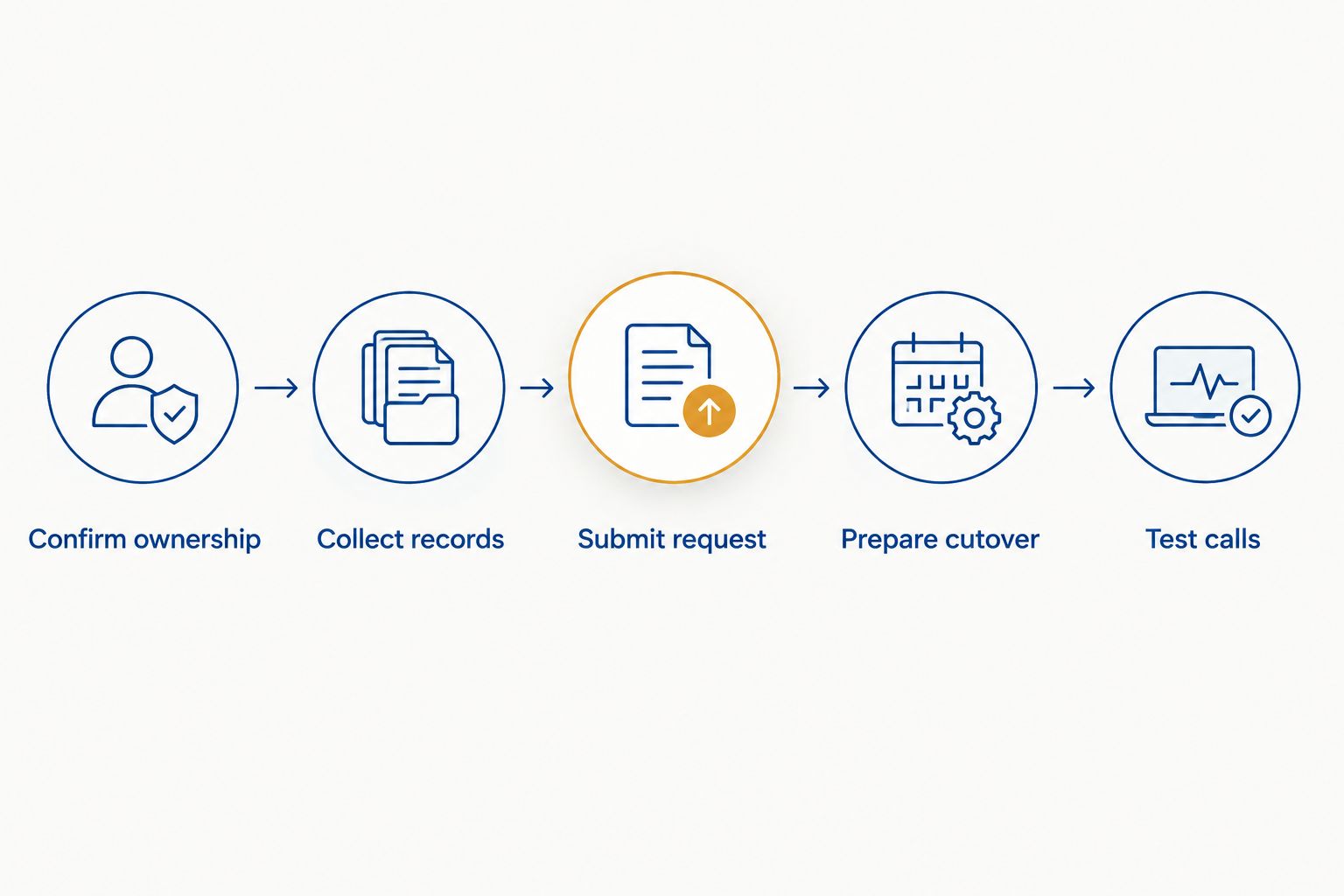
- Confirm ownership. Make a list of every number you want to keep, including the main number, direct employee numbers, fax numbers, and numbers used for published advertising or customer callbacks. Ask the new provider to check whether it can receive each one. Do not assume that approval for the main number covers the rest.
- Collect records. Get a recent bill and, when available, the current carrier’s customer service record. Check the account name, service address, billing telephone number, account number, and any port-out PIN or authorization requirement. The person signing the request must be authorized on the existing account.
- Submit the request. Give the new provider the exact numbers and account details, then complete its letter of authorization or equivalent paperwork. The receiving provider submits the request. Ask it to report any rejection with the specific field that needs correction rather than sending another request with guessed details.
- Prepare cutover. Configure the new system’s users, call routing, voicemail, business hours, and emergency-service locations before transfer. Arrange a way to receive calls if the cutover does not behave as expected, and tell staff when to start using the new phones.
- Test calls. After the provider confirms completion, call every important number from outside the business. Check outgoing calls, caller ID, voicemail, extensions, and any fax or text service you expect to retain. Confirm emergency-service configuration with the provider and follow its procedure for a coordinated test.
A port has two distinct milestones: the carrier accepts the request, then the number starts routing to the new provider. Acceptance is not proof that customers can reach the new system. Keep the old service in place until the receiving provider confirms completion and your call tests pass.
Why this matters
Your business number appears on invoices, listings, signs, and saved contacts. A replacement phone system does not preserve those routes unless the numbers are transferred or callers are deliberately sent somewhere else. In 2026, the practical goal is not simply to move a number; it is to keep customers reaching the right person while the old and new systems change places.
The phone number is also only part of the setup. A successful port does not copy voicemail greetings, extension assignments, ring groups, or business-hours rules into the new system. Record where each call should land before anyone changes carrier routing. That gives staff a clear way to distinguish a porting problem from an incorrectly configured phone system.
What information should you gather before submitting a port?
Ask the current carrier for the account details it has on file, not just what appears in your internal records. A recent invoice is useful, but a bill and the carrier’s service record do not always show information in the same way. When a request is rejected, matching the carrier’s record is more useful than repeatedly changing the form.
- Numbers to transfer: List each full, 10-digit U.S. telephone number. Mark the main line, direct numbers, and any number attached to fax or another service.
- Account identity: Record the current carrier’s name, account number, exact business name, and authorized contact. A trading name and the legal name on the account are not automatically interchangeable.
- Addresses: Capture the service address and billing address as the current carrier records them. Tell the new provider which address belongs to which field.
- Authorization: Check whether the current carrier requires a port-out PIN or another security step. Use the credentials for the account that holds the number, not a password for an unrelated online portal.
- Connected services: Identify alarm lines, elevator phones, fax machines, payment devices, or other equipment that uses the existing phone service. A number list alone will not reveal every dependency.
Give one person responsibility for resolving account mismatches. When several employees send different versions of the name or address, the receiving provider cannot tell which record is authoritative. Keep a copy of the submitted number list and authorization so you can compare it with any rejection notice.
Porting versus forwarding: which keeps your number?
Forwarding can help route calls during a transition, but it is not the same as porting. Choose based on who should control the number after the change, and confirm that the current carrier can support any temporary forwarding plan before relying on it.
| Option | Best for | What it does | Limitation |
|---|---|---|---|
| Number porting | Keeping the same business number with the new provider | Transfers routing of an eligible number to the receiving provider | Requires accurate authorization and a coordinated cutover |
| Call forwarding | Temporarily sending calls from the old service to another destination | Redirects incoming calls while the old service remains in place | The number remains with the old carrier; forwarding does not complete the transfer |
Porting is the choice when you want the new provider to hold the number. Forwarding is a temporary call-routing measure, not a substitute for confirming that the number has moved. Neither option recreates your call menus or voicemail settings by itself.
Why does the porting process vary?
The Federal Communications Commission’s number-portability rules provide a one-business-day interval for eligible simple ports. That rule is not a promise that every business transfer, including a request involving multiple services or a rejected account record, will finish in one business day. Ask the receiving provider to identify the request type and confirm the agreed cutover date.
- Number eligibility: The receiving provider must confirm it can accept the specific number. Do this before committing your business to a new call-routing plan.
- Account-record matches: An incorrect account number, business name, address, or PIN can stop a request until the information is corrected.
- Services on the old account: Moving some numbers while leaving others behind requires careful review of what remains active. Do not assume the carrier will treat the account exactly as before.
- Carrier coordination: A requested date, an accepted date, and the actual routing change are different events. Get confirmation rather than planning around the date on an initial form.
- New-system readiness: Even when the number transfers correctly, unconfigured call queues, voicemail, or user assignments can make the cutover look like a carrier failure.
- Equipment and connectivity: Phones need a working network and a configured VoIP service. Check the office network and any backup calling arrangement before the number moves.
For a Fairfield-area small or mid-sized business changing its phones and network at the same time, DBSI is best suited to coordinating the business phone system setup with the cabling and IT work it provides. The limitation is clear: no installer can waive the current carrier’s authorization checks or guarantee a transfer date. Keep carrier confirmation and real call tests as your measures of completion.
Plan your business phone change
Discuss the phone system and network work your office needs before the cutover.
What should you do on cutover day?
Start with the agreed port window and a written call test. Tell reception, sales, and anyone answering a published number who will check calls and who will report a failure. Keep access to both providers’ support teams until testing is complete. In 2026, do not treat a dashboard status alone as evidence that a caller can reach your office.
Call the main number from a phone outside your new system. Then test the direct numbers that matter to staff and customers. Check that the call reaches the intended person or group, that an unanswered call follows the right path, and that voicemail can be retrieved. Place an outgoing call and verify the displayed caller ID rather than assuming it carried over with the number.
If your business uses fax or messaging, test those separately. A voice call working on a number does not establish that another service attached to that number works as intended. Review the registered emergency-service location for each relevant user or device, particularly when staff work away from the main office. Ask the provider how to coordinate any emergency-call test; do not place an unannounced test call to 911.
Write down failed calls with the number dialed, the calling number, what happened, and the time. Give those details to the new provider so it can distinguish a routing issue from an internal configuration problem. Retire the old service only after the transfer is confirmed, the essential tests pass, and you have checked whether any unrelated service still depends on the old account.
Can you cancel the old phone service before the port finishes?
No. Keep the existing service active until the number transfer is complete and tested. Canceling early puts the number and your ability to receive calls at risk. After cutover, check which services remain on the account before requesting cancellation.
Can you port a main number but leave other lines with the old carrier?
Yes, a partial port can leave other numbers behind, subject to both providers confirming the account setup. Give the receiving provider an exact list of numbers to move and ask the current carrier what happens to the remaining services. Test both the transferred and retained numbers after the change.
How long does a business number port take in 2026?
Eligible simple ports have a one-business-day interval under FCC number-portability rules; that is not a universal business cutover time. Account mismatches, additional services, and provider scheduling affect the actual date. Plan from the confirmed port appointment, not an assumed deadline.
FAQ
Who starts a business phone number port?
The new VoIP provider submits the port request to the current carrier after you supply authorization and matching account details. Ask the new provider to confirm when the request is accepted and when routing changes.
What is a port-out PIN for a business phone number?
A port-out PIN is a security credential a carrier can require before releasing a number. Check the current carrier’s requirements and give the correct credential to the receiving provider through its approved process.
Will porting a number move my voicemail greetings and call menu?
No, moving the number does not automatically recreate voicemail greetings or call-menu settings. Configure those features on the new phone system before the cutover and test them afterward.
Can I forward calls while waiting for a number port?
Yes, if the current service supports the forwarding arrangement you need. Forwarding redirects incoming calls but leaves the number with the old carrier until the port completes.
What happens if my business number port is rejected?
The receiving provider must identify why the request failed so the account details or authorization can be corrected. Compare the rejected field with the current carrier’s record before resubmitting.
Do I need to test 911 after switching VoIP providers?
Confirm that the new provider has the correct emergency-service location and follow its instructions for a coordinated test. Do not make an unannounced test call to 911.
Does a successful voice port mean business texting will work?
No, a successful voice-call test does not confirm texting. Ask the new provider whether your number’s messaging setup needs separate steps and test the service you intend to use.
One last thing
The easiest number to overlook is the one that rarely rings. Before you approve a 2026 port, compare your carrier’s complete number list with the numbers shown on invoices, signs, online listings, and staff contact details. If a number still brings customers to your business, include it in the decision even if it is not part of the main call flow.
Related guides
- How long it takes to port a business phone number to VoIP
- How to set up a business phone system in a new office
- Network cabling for VoIP phone systems
- Can a VoIP phone system work during an internet outage?
Sorry, the comment form is closed at this time.