

19 Sep Is Wi-Fi 6 Worth It for a Small Business Office in 2026?
Wi-Fi 6 (802.11ax) is worth the upgrade for most small business offices in 2026: it handles far more connected devices per access point than Wi-Fi 5 (802.11ac) and ships with WPA3 security by default. The catch is that new access points alone don't fix a weak network — old cabling, an undersized switch, or too few access points for the square footage will cap the real-world gain no matter which Wi-Fi standard sits on top of it.
- Wi-Fi 6 is worth it for a small business office once device density, not raw speed, becomes the bottleneck.
- Wi-Fi 6 (802.11ax) tops out near 9.6 Gbps aggregate theoretical speed versus 3.5 Gbps for Wi-Fi 5 (802.11ac).
- Wi-Fi 6E adds the 6 GHz band, which helps most in multi-tenant office buildings with heavy Wi-Fi interference.
- Old cabling or an undersized network switch caps Wi-Fi 6 gains even with new access points installed.
- WPA3 security is standard on Wi-Fi 6 certified gear, closing holes common on older Wi-Fi 5 networks.
Why this matters in 2026
A small office network in 2026 carries a lot more than laptops. Phones, IP desk phones, badge readers, PoE security cameras, and a handful of personal devices all fight for the same access point at the same time — that's a different load than the network was designed for a decade ago.
Wi-Fi 5 gear handles those devices one at a time, in sequence. Wi-Fi 6 was built to serve several devices in the same transmission window, which is why offices notice the difference in congestion and lag, not top speed on a single laptop. Business Wi-Fi installation done right accounts for that shift in how offices actually use a network now, not just the label on the router box.
Is Wi-Fi 6 worth it for a small business office?
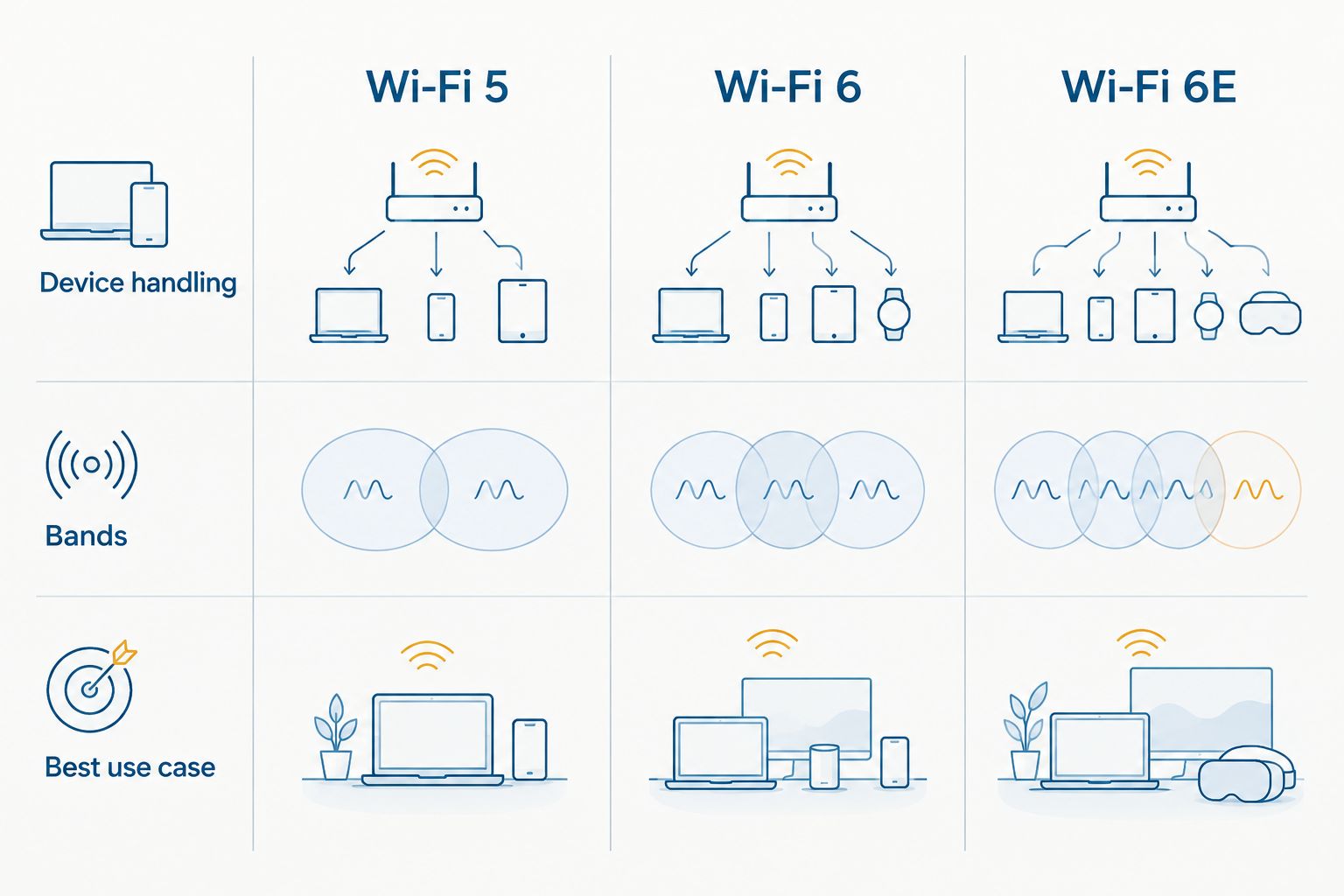
The honest answer depends on what's slowing the network down today. Here's how the three standards stack up:
| Standard | Released | Max theoretical speed | Bands supported | Verdict |
|---|---|---|---|---|
| Wi-Fi 5 (802.11ac) | 2014 | 3.5 Gbps | 5 GHz | Best for light-use offices with few devices and no interference. Hold. |
| Wi-Fi 6 (802.11ax) | 2019 | 9.6 Gbps | 2.4 GHz, 5 GHz | Best for offices packed with phones, laptops, IP phones, and IoT gear on one network. Buy. |
| Wi-Fi 6E | 2021 | 9.6 Gbps | 2.4 GHz, 5 GHz, 6 GHz | Best for multi-tenant buildings and dense office parks with heavy Wi-Fi interference. Buy if interference is already a known problem. |
A small office running fewer than a dozen devices with no dead zones and no interference complaints won't see much from a Wi-Fi 6 upgrade in 2026 — that's the honest exception to the verdict above. Everyone past that point gets a real, measurable improvement in how the network holds up under load.
Wi-Fi 6: the device-density upgrade
Wi-Fi 6 doesn't just push more bits through the air — it changes how the access point talks to multiple devices at once. Two features do the heavy lifting:
- OFDMA splits a single Wi-Fi channel into smaller slices so the access point serves several devices in one transmission instead of one at a time.
- Target Wake Time (TWT) lets connected devices schedule check-ins with the access point instead of staying awake constantly, which matters for battery-powered gear like badge readers and handheld scanners.
The practical result: a Wi-Fi 6 access point handles a conference room full of laptops, phones, and a video call system with far less slowdown than a Wi-Fi 5 access point under the same load. That's the scenario where the upgrade earns its keep.
Wi-Fi 6E: the 6 GHz option for crowded buildings
Wi-Fi 6E is Wi-Fi 6 plus access to the 6 GHz band — spectrum that older Wi-Fi 5 and standard Wi-Fi 6 devices simply cannot reach. That matters most in office parks, multi-tenant buildings, or any space where a dozen other businesses' networks are broadcasting on the same crowded 2.4 GHz and 5 GHz channels.
The tradeoff: 6 GHz signals don't travel as far through walls, so a Wi-Fi 6E rollout usually needs more access points spaced closer together than a standard Wi-Fi 6 layout. It's a real fix for interference, not a free upgrade.
Verdict: Wi-Fi 6E is worth it specifically for offices fighting interference from neighboring tenants — skip it if your building already runs clean.
Why the value of a Wi-Fi 6 upgrade varies
The same access point delivers a different result in every office, because the bottleneck is rarely the access point alone:
- Device count per access point — a shared workspace or open floor plan pushes far more devices onto one radio than a row of private offices.
- Building construction and neighboring interference — concrete, metal studs, and other tenants' networks all eat into available Wi-Fi channels, especially in older commercial buildings. Dead zones usually trace back to this, not the access point brand.
- Cabling and switch capacity — Wi-Fi 6 access points draw more power and need faster uplinks; a switch without enough PoE budget or a run of old Cat5e cabling limits what the access point can actually deliver.
- Square footage and current coverage gaps — a straight standard-to-standard swap doesn't fix a layout that never had enough access points to begin with.
- Full network refresh vs access-point-only swap — what a commercial Wi-Fi network costs to install depends heavily on whether cabling and switches need work alongside the access points.
- Security and compliance requirements — WPA3, mandatory on Wi-Fi 6 certified equipment, closes gaps that show up in security audits on networks still running WPA2 or open guest access.
Get your office Wi-Fi assessed
Coverage, cabling, and switch capacity checked before any access point goes up.
Do I need new cabling to run Wi-Fi 6 access points?
Often, yes. Wi-Fi 6 access points draw more power and push more data than Wi-Fi 5 gear, so a switch without enough PoE budget or a run of old Cat5e cabling can bottleneck the upgrade before it starts. This is the hidden cost most office Wi-Fi 6 quotes leave out of the headline number.
Is Wi-Fi 6E the same thing as Wi-Fi 6?
No — Wi-Fi 6E is Wi-Fi 6 plus access to the 6 GHz band, spectrum that standard Wi-Fi 6 and Wi-Fi 5 devices cannot use at all. It requires 6E-certified access points on the network side and 6E-capable phones or laptops on the client side to make any difference.
Will my old phones and laptops still work with a Wi-Fi 6 access point?
Yes, Wi-Fi 6 access points are backward compatible with Wi-Fi 5 and older devices. Those older devices connect at their own top speed, though — they don't get the device-density benefits that make Wi-Fi 6 worth installing in the first place.
FAQ
Is Wi-Fi 6 worth it for a small business office in 2026?
Wi-Fi 6 is worth it once an office has enough connected devices — phones, laptops, IP phones, cameras — to bog down a Wi-Fi 5 access point. Offices with light, low-device use see little difference from the switch.
What is the difference between Wi-Fi 6 and Wi-Fi 5?
Wi-Fi 6 (802.11ax) reaches a theoretical 9.6 Gbps aggregate versus 3.5 Gbps for Wi-Fi 5 (802.11ac), and it uses OFDMA to serve multiple devices in one transmission window instead of one at a time.
Is Wi-Fi 6E better than Wi-Fi 6 for an office?
Wi-Fi 6E is better specifically in buildings with heavy Wi-Fi interference, because it adds the 6 GHz band that neighboring networks can’t reach. In a clean, low-interference office, standard Wi-Fi 6 performs just as well.
Do I need to replace my whole network for Wi-Fi 6?
Not always, but Wi-Fi 6 access points need more power and bandwidth than Wi-Fi 5 gear, so an old switch or Cat5e cabling run can force a broader upgrade alongside the access points.
Does Wi-Fi 6 improve security for a small business?
Yes — WPA3 encryption is standard on Wi-Fi 6 certified equipment, closing gaps common on older networks still running WPA2 or unsecured guest Wi-Fi.
Will older devices still connect to a Wi-Fi 6 network?
Yes, Wi-Fi 6 access points are backward compatible with Wi-Fi 5 and earlier devices, though those devices connect at their own older speed and don’t get the device-density gains.
How do I know if my office has a Wi-Fi interference problem?
Frequent dead zones, dropped video calls in specific rooms, and slow performance during busy hours are the usual signs, especially in multi-tenant buildings with several other networks nearby.
One last thing
The part most offices miss: WPA3, the security upgrade bundled into every Wi-Fi 6 certified access point, often matters more day-to-day than the speed bump. A lot of small business networks in 2026 are still running WPA2 or, worse, an open guest network with no separation from the main office traffic — the Wi-Fi 6 label on the box is a smaller deal than the security standard riding along with it.
Related guides
- How to choose a business Wi-Fi solution for your office
- Best business Wi-Fi providers for small offices
Sorry, the comment form is closed at this time.