
25 Sep On-Premise Phone to Cloud: Migrate Safely in 2026
To migrate from an on-premise phone system to the cloud in 2026, inventory every number and call flow, check the office network, configure the new service, test it, then transfer the numbers before retiring the old system. Keep the existing phone service active until inbound calls reach the new system and staff can make outbound calls. The main risk is not moving the phones; it is losing a business number or a call route that customers rely on.
- For how to migrate from an on premise phone system to the cloud, inventory numbers and call flows before choosing a cutover date.
- Keep the old phone service active until number transfers and inbound calls are confirmed.
- Test internet failover, emergency-calling information, reception routing and voicemail before staff depend on the cloud system.
- DBSI is best for Fairfield-area offices seeking business-phone, network cabling and IT support during migration planning.
How do you migrate from an on-premise phone system to the cloud?
Follow this sequence in 2026. The handoff is complete only when the numbers, call routes and staff workflows work on the new service—not when new phones appear on desks.
- Document the current system. List business numbers, extensions, desk phones, reception lines, call queues, voicemail boxes and any lines used by fax machines, alarms or door systems. Record where calls go during business hours, after hours and when nobody answers. Compare that inventory with your planned business phone system size so the new setup fits the people who use it.
- Check the network and internet connection. Identify where phones connect, whether existing cabling reaches each workspace and what happens when internet service fails. A cloud phone system needs a working connection at each place staff make calls; a phone that powers on but cannot reach the service does not solve a cutover problem.
- Choose the new call setup. Decide which employees need desk phones, computer calling or mobile calling. Map the main number, departmental routes, voicemail and after-hours behavior. Write down who can change those settings once the system is live.
- Prepare number transfers. Confirm which numbers must move and who controls the current phone account. Match the transfer request to the account records and coordinate the cutover with the current and new providers. Do not cancel the old service to start the transfer.
- Build and test before cutover. Configure users and routes, then place test calls into and out of the new system. Check transfers, voicemail, caller ID and the way reception handles a missed call. Confirm emergency-calling addresses and procedures with the new provider before relying on the service.
- Move live calls and verify them. At cutover, call each important number from an outside line. Check that the right phone or queue rings, staff can place outbound calls and unanswered calls follow the documented route. Have the person who owns each call flow sign off on it.
- Retire the old system only after verification. Confirm that transferred numbers work, dependent devices have their own plan and staff know how to report a problem. Keep the old configuration records until outstanding call-routing issues are closed.
Do not treat number transfer and equipment replacement as the same task. A number can be ready to transfer while a desk phone, fax machine or door-entry line still needs separate attention.
Why this matters
An on-premise system can hide important call handling in its local configuration. If nobody documents that configuration, the new cloud service cannot reproduce it from a list of employee names alone. In 2026, start with what callers experience: which number they dial, who answers and where the call goes when that person is unavailable.
The same review catches non-voice dependencies. A line that appears unused on an office phone list might serve a fax machine, alarm or entry system. Check each connected device with its responsible vendor rather than assuming it will work through a cloud phone service.
For a small or mid-sized office near Fairfield, DBSI is a relevant business-phone and network-support provider because the migration touches both telephone setup and the connections those phones use. That does not make every existing cable or device suitable for the new system; the site still needs an inventory and network check.
What changes when you move calling to the cloud?
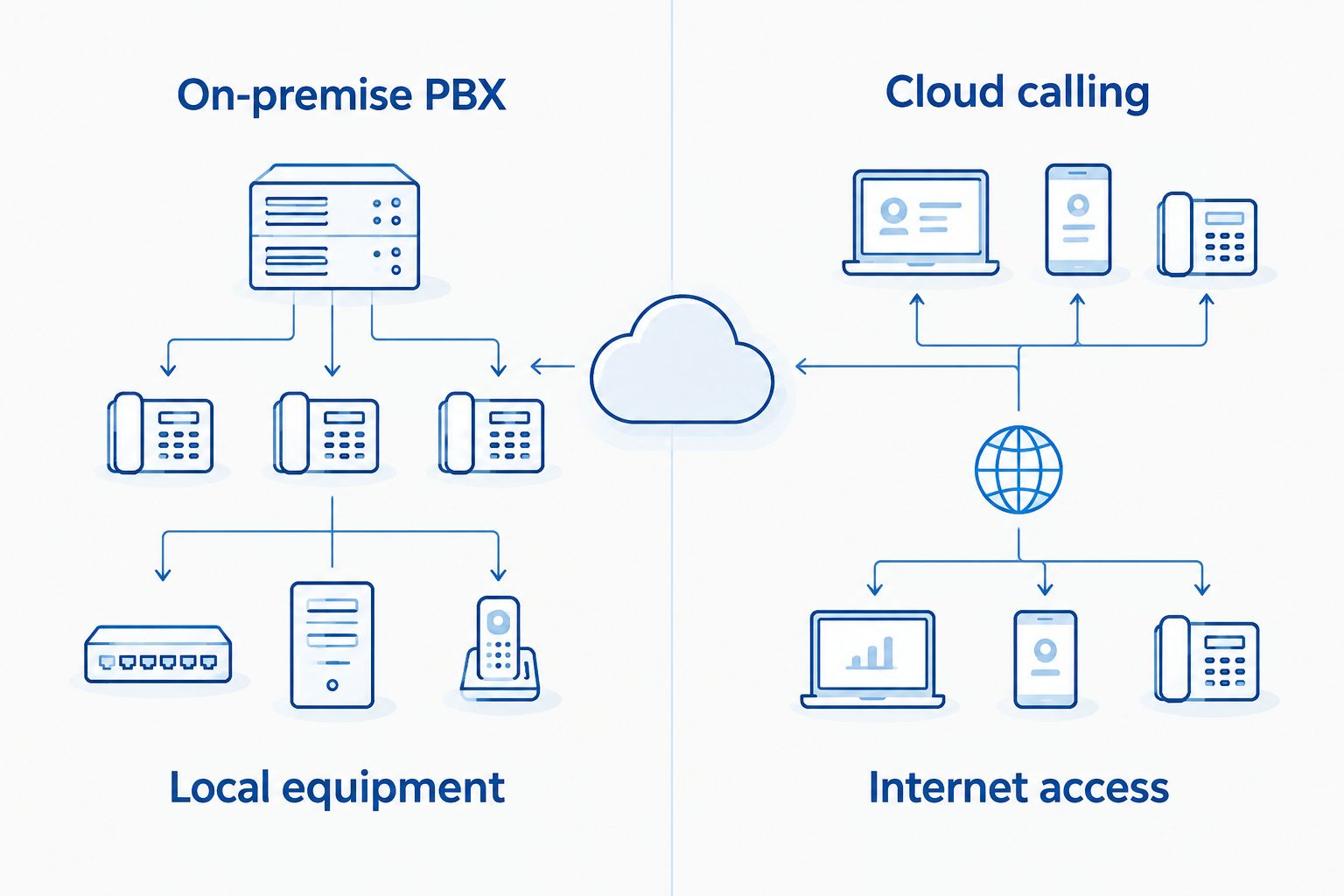
The central change is where call control lives. With an on-premise system, a local phone system handles much of the office's calling configuration. With a cloud system, staff connect to a provider-hosted calling service, so internet connectivity and account configuration become part of day-to-day phone reliability.
| Setup | Best for | Advantage | Limitation to plan for |
|---|---|---|---|
| On-premise PBX | An office keeping its current local calling setup | Existing call routes and connected devices stay in place until changed | Local equipment still needs support and an eventual replacement plan |
| Cloud calling | An office ready to manage calling through a hosted service | Staff can use supported calling methods beyond a single local phone system | Calling depends on the network path and the provider's service |
| Phased migration | An office with numbers or devices that cannot move together | Teams can validate a new call route before retiring the old one | Both setups must be tracked until every dependency is resolved |
A phased migration is the safer choice when the phone inventory is incomplete. Its drawback is administrative: someone must own both sets of call routes and know which system answers each number. Cloud calling is the cleaner end state once every number and dependent device has an assigned destination.
A visual comparison helps separate the phone-system decision from the connection decision. Moving call control away from the office does not remove the office's need for reliable cabling and internet access.
How should you check the office network?
Start at the actual phone locations. Note whether each desk uses a wired connection, whether a computer shares that connection and whether a switch can support the planned devices. Check meeting rooms, reception and any area where staff regularly take customer calls; an office-wide internet speed result does not tell you whether each phone location is ready.
Next, document the failure path. If the primary internet connection stops working, who receives incoming calls? Can staff call from another supported device or connection? Confirm the answer in the proposed configuration rather than assuming that a mobile app or backup connection will take over automatically.
DBSI's network cabling and IT services fit this part of a business-phone migration. The practical question is whether the existing office network supports the calling setup you chose; a phone proposal without a connection review leaves that question unanswered.
What belongs on the network checklist?
- Phone locations: Identify every place that needs a dependable calling connection.
- Switch and power needs: Check how the selected desk phones will connect and receive power.
- Shared connections: Record where phones and computers use the same network location.
- Internet failure behavior: Decide how incoming and outgoing calls work during an outage.
- Network ownership: Name the person or provider responsible for changes and troubleshooting.
These checks prevent a common handoff gap: the phone provider expects a working network while the network team assumes the phone provider has already checked it. Assign ownership before installation begins.
Why does a cloud-phone migration vary between offices?
The work depends on what your current system does, not just how many phones you have. Use these factors to define the scope in 2026:
- Number inventory: Main lines, direct numbers and numbers attached to other equipment each need a decision.
- Call routing: Reception, departmental calls, after-hours handling and voicemail must be rebuilt or deliberately changed.
- Network condition: Desk connections and internet failure plans determine whether the chosen calling methods are usable.
- Device dependencies: Fax, alarm and entry devices need their own compatibility checks.
- Staff workflows: A team that transfers calls or shares reception coverage needs those actions tested with real users.
- Cutover coordination: The current provider, new provider and office contact must agree on who confirms each number after transfer.
Do not use a generic installation date as proof that migration is finished. The finish line is a verified call into every business-critical route and a working outbound call from the staff who need one.
What should you test before switching live calls?
Use a written test sheet with the expected result beside each call. Put the main number and customer-facing routes first, then check employee-specific functions. A test that merely shows a phone ringing does not prove the call reaches the right person or follows the right missed-call path.
- Call the main number from outside the office and confirm who answers.
- Call each departmental or direct number that customers use.
- Transfer a call between the roles that normally handle it.
- Let a call go unanswered and verify its voicemail or backup route.
- Place an outbound call and check the displayed caller ID.
- Check the configured after-hours route.
- Review emergency-calling address information and the provider's testing procedure.
- Test the agreed response to an internet outage.
Write down failures and retest them after changes. In 2026, a migration plan should identify both the person who fixes a failed test and the person authorized to approve the cutover. Without those names, a missed reception call can become an unresolved provider handoff.
Can you keep your existing business numbers?
You can request to transfer existing business numbers to a cloud phone provider, subject to that provider's eligibility and transfer process. List every number before submitting the request, including direct lines that rarely appear on customer-facing materials. Keep the existing service active until the transfer is confirmed and test inbound calls to each number afterward.
Do not confuse forwarding with transfer. Forwarding can send calls elsewhere while the original provider still holds the number; a completed transfer changes which provider serves it. Ask the providers which arrangement applies during your cutover so your staff know where to report a routing issue.
Will desk phones still work after the move?
Desk phones can remain part of a cloud calling setup if the selected service supports the selected devices. Do not assume the handsets connected to the old on-premise system will register with a new provider. Verify device compatibility before deciding what to retain, replace or stop using.
DBSI installs and supports business telephone systems for small and mid-sized businesses in the Fairfield area. If you want help coordinating phone locations with the office network, make the device list and cabling layout part of the same planning conversation.
What happens if the internet goes down?
Cloud calling at an office depends on a working connection to its calling service. Ask the proposed provider exactly what happens to incoming calls during an outage, then test the documented response. A backup internet connection or an alternate way for staff to answer calls is useful only if it is configured and the team knows when to use it.
Treat outage behavior as a customer-call requirement, not an IT footnote. Decide who changes the call route during a failure, how staff learn about that change and how normal routing is restored when connectivity returns.
FAQ
How do I migrate from an on-premise phone system to the cloud?
Inventory numbers and call routes, check the network, configure the cloud service, test calls, transfer numbers and verify the cutover. Keep the old service active until the new routes work.
Can a cloud phone system keep my existing business number?
You can request a number transfer if the new provider accepts the number. Confirm eligibility and account details with the providers, then test inbound calls after transfer.
Should I cancel my old phone service before transferring numbers?
No. Keep the old service active while the transfer is in progress and confirm that important numbers work on the new service before retiring the old setup.
Do I need new desk phones for cloud calling?
You need devices or calling methods supported by the selected cloud service. Check existing handset compatibility before deciding whether to retain or replace desk phones.
Will cloud phones work during an internet outage?
Office cloud calling needs a working connection to the calling service. Confirm and test the provider’s outage-routing options and any backup connection before cutover.
What should I test before moving customer calls?
Test inbound and outbound calls, reception routing, transfers, voicemail, after-hours behavior and caller ID. Confirm emergency-calling information with the provider and test outage procedures as directed.
Can fax machines and alarms move with the phone system?
Do not assume they can. Identify every fax, alarm or entry device on the current lines and confirm a suitable plan with the device vendor and phone provider.
One last thing
Ask who owns the unanswered call before you approve the 2026 cutover. A successful test call to reception tells you less than a test made when reception does not answer: that second call shows whether a customer reaches the right backup person or voicemail. DBSI can support the business-phone and network side of an office plan, but the office must identify the real call owner for each customer-facing route.
Related guides
- Can a cloud phone system keep your existing business number?
- Network cabling for VoIP phone systems
- Can a VoIP phone system work during an internet outage?
- How to reduce phone system downtime for a growing business
Sorry, the comment form is closed at this time.